'%3e%3crect%20width='48'%20height='48'%20x='1'%20y='1'%20fill='%23161432'%20rx='2'/%3e%3cpath%20stroke='%230075ff'%20stroke-width='2'%20d='M1%209V3a2%202%200%200%201%202-2h6m40%208V3a2%202%200%200%200-2-2h-6M1%2041v6a2%202%200%200%200%202%202h6m40-8v6a2%202%200%200%201-2%202h-6'/%3e%3cpath%20stroke='%230075ff'%20stroke-linecap='round'%20stroke-linejoin='round'%20stroke-width='2'%20d='M16%2016v16a2%202%200%200%200%202%202h16'/%3e%3cpath%20stroke='%230075ff'%20stroke-linecap='round'%20stroke-linejoin='round'%20stroke-width='2'%20d='m32%2022-5%205-4-4-3%203'/%3e%3c/g%3e%3cdefs%3e%3cfilter%20id='a'%20width='50'%20height='50'%20x='0'%20y='0'%20color-interpolation-filters='sRGB'%20filterUnits='userSpaceOnUse'%3e%3cfeFlood%20flood-opacity='0'%20result='BackgroundImageFix'/%3e%3cfeBlend%20in='SourceGraphic'%20in2='BackgroundImageFix'%20result='shape'/%3e%3cfeColorMatrix%20in='SourceAlpha'%20result='hardAlpha'%20values='0%200%200%200%200%200%200%200%200%200%200%200%200%200%200%200%200%200%20127%200'/%3e%3cfeOffset/%3e%3cfeGaussianBlur%20stdDeviation='3'/%3e%3cfeComposite%20in2='hardAlpha'%20k2='-1'%20k3='1'%20operator='arithmetic'/%3e%3cfeColorMatrix%20values='0%200%200%200%200%200%200%200%200%200.458824%200%200%200%200%201%200%200%200%201%200'/%3e%3cfeBlend%20in2='shape'%20result='effect1_innerShadow_1290_20821'/%3e%3c/filter%3e%3c/defs%3e%3c/svg%3e)
Statistic datа
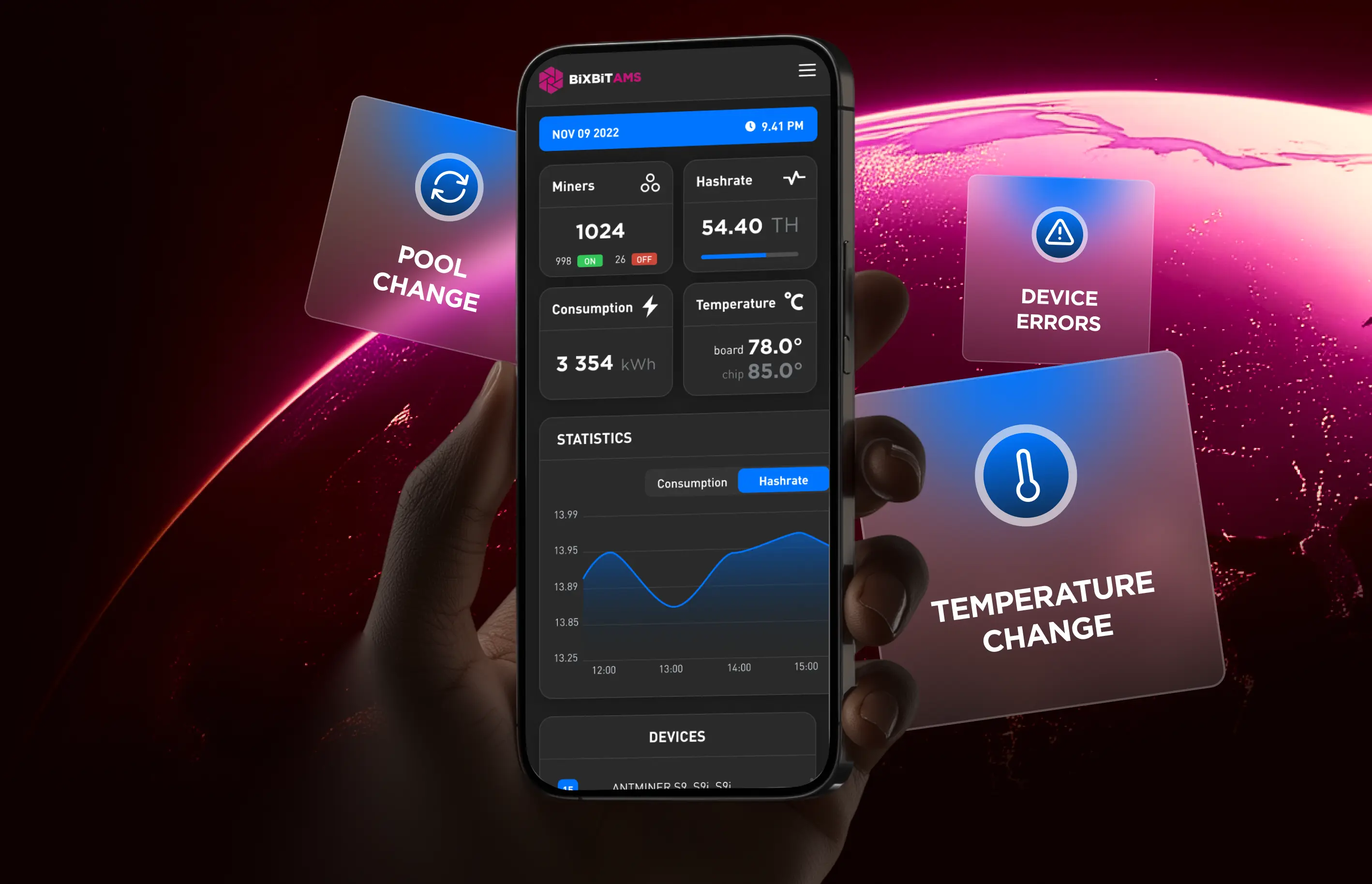
Be constantly aware of the hashrate, temperature, power consumption and profitability dynamics as of one miner or the entire farm.
'%3e%3cpath%20stroke='%23fff'%20stroke-width='.3'%20d='M3.83%204.108%209.891.6l2.64%201.525v7.007zM.15%2013.211V6.236l2.677-1.549%206.044%203.49zm6.058%207.702L.15%2017.443v-3.075l6.058-3.497zm9.712-1.382-6.038%203.485-2.671-1.53v-6.983zm3.672-2.118-2.669%201.54-6.049-3.492%208.718-5.034zm.001-11.209V9.27l-6.058%203.498V2.704zm-9.72%202.551%202.658%201.535v3.056l-2.66%201.536-2.66-1.536v-3.053z'/%3e%3cpath%20d='M24.273%2017.496V6.192h5.936q2.115%200%203.158%201.017.744.728.744%201.857%200%201.76-1.785%202.519%201.124.354%201.712%201.017t.587%201.775q0%201.454-1.158%202.285-1.157.83-3.224.834zm3.125-2.518h2.48q1.537%200%201.538-1.066%200-1.017-1.571-1.017h-2.446zm0-4.279h2.018q1.52%200%201.52-1.017%200-.968-1.454-.968h-2.084zm8.582%206.797V8.762h3.14v8.734zm-.067-9.525V6.195h3.274V7.97zm4.297%209.525%203.966-5.747-3.802-5.553h3.69l2.05%203.181%202.066-3.18h3.605l-3.802%205.52%203.966%205.78h-3.685l-2.216-3.406-2.232%203.406zm12.946%200V6.192h5.935q2.115%200%203.158%201.017.744.728.744%201.857%200%201.76-1.785%202.519%201.124.354%201.712%201.017t.587%201.775q0%201.454-1.157%202.285-1.157.83-3.224.832zm3.125-2.518h2.48q1.538%200%201.538-1.066%200-1.017-1.57-1.017h-2.447zm0-4.279h2.017q1.52%200%201.52-1.017%200-.968-1.454-.968h-2.081zm8.58%206.797V8.762h3.141v8.734zm-.067-9.525V6.195h3.274V7.97zm7.972%209.525V8.939h-3.471V6.195h10.151v2.744h-3.472v8.557z'/%3e%3c/g%3e%3cdefs%3e%3cclipPath%20id='a'%3e%3cpath%20fill='%23fff'%20d='M0%200h80v24H0z'/%3e%3c/clipPath%3e%3c/defs%3e%3c/svg%3e)

Real-time device data, core control features, and flexible alerts — all available in a single online service 24/7.
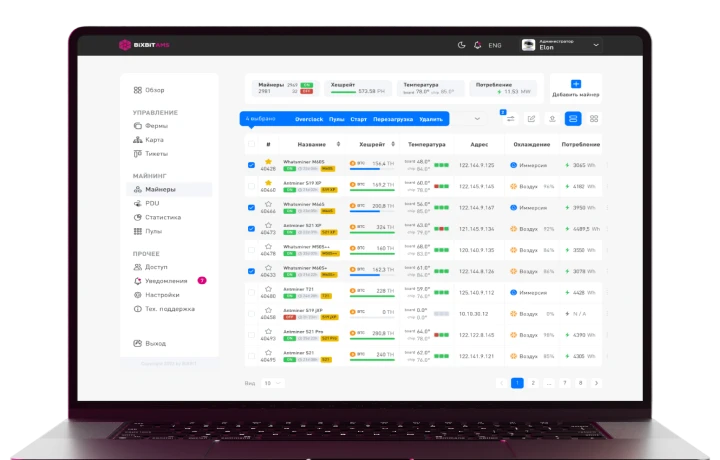
Explore the AMS interface in the demo mode
Open the Live Demo AMSWe packed all important ASIC miner monitoring features in one place for the best possible user experience
Be constantly aware of the hashrate, temperature, power consumption and profitability dynamics as of one miner or the entire farm.
'%3e%3crect%20width='48'%20height='48'%20x='1'%20y='1'%20fill='%23161432'%20rx='2'/%3e%3cpath%20stroke='%230075ff'%20stroke-width='2'%20d='M1%209V3a2%202%200%200%201%202-2h6m40%208V3a2%202%200%200%200-2-2h-6M1%2041v6a2%202%200%200%200%202%202h6m40-8v6a2%202%200%200%201-2%202h-6'/%3e%3cpath%20stroke='%230075ff'%20stroke-linecap='round'%20stroke-linejoin='round'%20stroke-width='2'%20d='M17%2034v-7m0-4v-7m8%2018v-9m0-4v-5m8%2018v-5m0-4v-9M15%2027h4m4-6h4m4%208h4'/%3e%3c/g%3e%3cdefs%3e%3cfilter%20id='a'%20width='50'%20height='50'%20x='0'%20y='0'%20color-interpolation-filters='sRGB'%20filterUnits='userSpaceOnUse'%3e%3cfeFlood%20flood-opacity='0'%20result='BackgroundImageFix'/%3e%3cfeBlend%20in='SourceGraphic'%20in2='BackgroundImageFix'%20result='shape'/%3e%3cfeColorMatrix%20in='SourceAlpha'%20result='hardAlpha'%20values='0%200%200%200%200%200%200%200%200%200%200%200%200%200%200%200%200%200%20127%200'/%3e%3cfeOffset/%3e%3cfeGaussianBlur%20stdDeviation='3'/%3e%3cfeComposite%20in2='hardAlpha'%20k2='-1'%20k3='1'%20operator='arithmetic'/%3e%3cfeColorMatrix%20values='0%200%200%200%200%200%200%200%200%200.458824%200%200%200%200%201%200%200%200%201%200'/%3e%3cfeBlend%20in2='shape'%20result='effect1_innerShadow_1290_20833'/%3e%3c/filter%3e%3c/defs%3e%3c/svg%3e)
The control panel allows you to manage crypto miners parameters: change the pool, restart the device, and stop/start mining
'%3e%3crect%20width='48'%20height='48'%20x='2'%20y='1'%20fill='%23161432'%20rx='2'/%3e%3cpath%20stroke='%230075ff'%20stroke-width='2'%20d='M1.922%209V3a2%202%200%200%201%202-2h6m40%208V3a2%202%200%200%200-2-2h-6m-40%2040v6a2%202%200%200%200%202%202h6m40-8v6a2%202%200%200%201-2%202h-6'/%3e%3cpath%20stroke='%230075ff'%20stroke-linecap='round'%20stroke-linejoin='round'%20stroke-width='2'%20d='M18%2035V17a1%201%200%200%201%20.4-.8A6%206%200%200%201%2022%2015c3%200%205%202%207.333%202q2%200%203.067-.8a1%201%200%200%201%201.6.8v10a1%201%200%200%201-.4.8A6%206%200%200%201%2030%2029c-3%200-5-2-8-2a6%206%200%200%200-4%201.528'/%3e%3c/g%3e%3cdefs%3e%3cfilter%20id='a'%20width='50'%20height='50'%20x='.922'%20y='0'%20color-interpolation-filters='sRGB'%20filterUnits='userSpaceOnUse'%3e%3cfeFlood%20flood-opacity='0'%20result='BackgroundImageFix'/%3e%3cfeBlend%20in='SourceGraphic'%20in2='BackgroundImageFix'%20result='shape'/%3e%3cfeColorMatrix%20in='SourceAlpha'%20result='hardAlpha'%20values='0%200%200%200%200%200%200%200%200%200%200%200%200%200%200%200%200%200%20127%200'/%3e%3cfeOffset/%3e%3cfeGaussianBlur%20stdDeviation='3'/%3e%3cfeComposite%20in2='hardAlpha'%20k2='-1'%20k3='1'%20operator='arithmetic'/%3e%3cfeColorMatrix%20values='0%200%200%200%200%200%200%200%200%200.458824%200%200%200%200%201%200%200%200%201%200'/%3e%3cfeBlend%20in2='shape'%20result='effect1_innerShadow_1290_20852'/%3e%3c/filter%3e%3c/defs%3e%3c/svg%3e)
The system allows you to assign tasks to your colleagues and track their progress at every stage — from creation to completion
'%3e%3crect%20width='48'%20height='48'%20x='1'%20y='1'%20fill='%23161432'%20rx='2'/%3e%3cpath%20stroke='%230075ff'%20stroke-width='2'%20d='M1%209V3a2%202%200%200%201%202-2h6m40%208V3a2%202%200%200%200-2-2h-6M1%2041v6a2%202%200%200%200%202%202h6m40-8v6a2%202%200%200%201-2%202h-6'/%3e%3cpath%20stroke='%230075ff'%20stroke-linecap='round'%20stroke-linejoin='round'%20stroke-width='2'%20d='M29%2034v-2a4%204%200%200%200-4-4h-6a4%204%200%200%200-4%204v2m14-17.872a4%204%200%200%201%200%207.744M35%2034v-2a4%204%200%200%200-3-3.87M22%2024a4%204%200%201%200%200-8%204%204%200%200%200%200%208'/%3e%3c/g%3e%3cdefs%3e%3cfilter%20id='a'%20width='50'%20height='50'%20x='0'%20y='0'%20color-interpolation-filters='sRGB'%20filterUnits='userSpaceOnUse'%3e%3cfeFlood%20flood-opacity='0'%20result='BackgroundImageFix'/%3e%3cfeBlend%20in='SourceGraphic'%20in2='BackgroundImageFix'%20result='shape'/%3e%3cfeColorMatrix%20in='SourceAlpha'%20result='hardAlpha'%20values='0%200%200%200%200%200%200%200%200%200%200%200%200%200%200%200%200%200%20127%200'/%3e%3cfeOffset/%3e%3cfeGaussianBlur%20stdDeviation='3'/%3e%3cfeComposite%20in2='hardAlpha'%20k2='-1'%20k3='1'%20operator='arithmetic'/%3e%3cfeColorMatrix%20values='0%200%200%200%200%200%200%200%200%200.458824%200%200%200%200%201%200%200%200%201%200'/%3e%3cfeBlend%20in2='shape'%20result='effect1_innerShadow_1290_20864'/%3e%3c/filter%3e%3c/defs%3e%3c/svg%3e)
Allows you to create different user roles with flexible access rights settings. You can define which actions are available for each role, ensuring ASIC software security and convenient system management
'%3e%3crect%20width='48'%20height='48'%20x='2'%20y='1'%20fill='%23161432'%20rx='2'/%3e%3cpath%20stroke='%230075ff'%20stroke-linecap='round'%20stroke-linejoin='round'%20stroke-width='2'%20d='M26.83%2015.18a2%202%200%200%200-1.66%200l-8.57%203.9a1%201%200%200%200%200%201.83l8.58%203.91a2%202%200%200%200%201.66%200l8.58-3.9a1%201%200%200%200%200-1.83z'/%3e%3cpath%20stroke='%230075ff'%20stroke-linecap='round'%20stroke-linejoin='round'%20stroke-width='2'%20d='M16%2025a1%201%200%200%200%20.58.91l8.6%203.91a2%202%200%200%200%201.65%200l8.58-3.9A1%201%200%200%200%2036%2025'/%3e%3cpath%20stroke='%230075ff'%20stroke-linecap='round'%20stroke-linejoin='round'%20stroke-width='2'%20d='M16%2030a1%201%200%200%200%20.58.91l8.6%203.91a2%202%200%200%200%201.65%200l8.58-3.9A1%201%200%200%200%2036%2030'/%3e%3cpath%20stroke='%230075ff'%20stroke-width='2'%20d='M1.922%209V3a2%202%200%200%201%202-2h6m40%208V3a2%202%200%200%200-2-2h-6m-40%2040v6a2%202%200%200%200%202%202h6m40-8v6a2%202%200%200%201-2%202h-6'/%3e%3c/g%3e%3cdefs%3e%3cfilter%20id='a'%20width='50'%20height='50'%20x='.922'%20y='0'%20color-interpolation-filters='sRGB'%20filterUnits='userSpaceOnUse'%3e%3cfeFlood%20flood-opacity='0'%20result='BackgroundImageFix'/%3e%3cfeBlend%20in='SourceGraphic'%20in2='BackgroundImageFix'%20result='shape'/%3e%3cfeColorMatrix%20in='SourceAlpha'%20result='hardAlpha'%20values='0%200%200%200%200%200%200%200%200%200%200%200%200%200%200%200%200%200%20127%200'/%3e%3cfeOffset/%3e%3cfeGaussianBlur%20stdDeviation='3'/%3e%3cfeComposite%20in2='hardAlpha'%20k2='-1'%20k3='1'%20operator='arithmetic'/%3e%3cfeColorMatrix%20values='0%200%200%200%200%200%200%200%200%200.458824%200%200%200%200%201%200%200%200%201%200'/%3e%3cfeBlend%20in2='shape'%20result='effect1_innerShadow_1290_20878'/%3e%3c/filter%3e%3c/defs%3e%3c/svg%3e)
Switch modes between maximum energy efficiency and peak performance, depending on the situation.
'%3e%3crect%20width='48'%20height='48'%20x='1'%20y='1'%20fill='%23161432'%20rx='2'/%3e%3cpath%20stroke='%230075ff'%20stroke-width='2'%20d='M1%209V3a2%202%200%200%201%202-2h6m40%208V3a2%202%200%200%200-2-2h-6M1%2041v6a2%202%200%200%200%202%202h6m40-8v6a2%202%200%200%201-2%202h-6'/%3e%3cpath%20stroke='%230075ff'%20stroke-linecap='round'%20stroke-linejoin='round'%20stroke-width='2'%20d='M25%2025h.01M29%2025h.01m.99-5%205%205-5%205M20%2020l-5%205%205%205m1-5h.01'/%3e%3c/g%3e%3cdefs%3e%3cfilter%20id='a'%20width='50'%20height='50'%20x='0'%20y='0'%20color-interpolation-filters='sRGB'%20filterUnits='userSpaceOnUse'%3e%3cfeFlood%20flood-opacity='0'%20result='BackgroundImageFix'/%3e%3cfeBlend%20in='SourceGraphic'%20in2='BackgroundImageFix'%20result='shape'/%3e%3cfeColorMatrix%20in='SourceAlpha'%20result='hardAlpha'%20values='0%200%200%200%200%200%200%200%200%200%200%200%200%200%200%200%200%200%20127%200'/%3e%3cfeOffset/%3e%3cfeGaussianBlur%20stdDeviation='3'/%3e%3cfeComposite%20in2='hardAlpha'%20k2='-1'%20k3='1'%20operator='arithmetic'/%3e%3cfeColorMatrix%20values='0%200%200%200%200%200%200%200%200%200.458824%200%200%200%200%201%200%200%200%201%200'/%3e%3cfeBlend%20in2='shape'%20result='effect1_innerShadow_1290_20891'/%3e%3c/filter%3e%3c/defs%3e%3c/svg%3e)
AMS can integrate with BiXBiT containers and monitor the operation of your cooling equipment. The panel provides data on more than 100 parameters and reports issues.
'%3e%3crect%20width='48'%20height='48'%20x='2'%20y='1'%20fill='%23161432'%20rx='2'/%3e%3cpath%20stroke='%230075ff'%20stroke-linecap='round'%20stroke-linejoin='round'%20stroke-width='2'%20d='M26%2035c5.523%200%2010-4.477%2010-10s-4.477-10-10-10-10%204.477-10%2010%204.477%2010%2010%2010'/%3e%3cpath%20stroke='%230075ff'%20stroke-linecap='round'%20stroke-linejoin='round'%20stroke-width='2'%20d='M26%2015a14.5%2014.5%200%200%200%200%2020%2014.5%2014.5%200%200%200%200-20M16%2025h20'/%3e%3cpath%20stroke='%230075ff'%20stroke-width='2'%20d='M1.922%209V3a2%202%200%200%201%202-2h6m40%208V3a2%202%200%200%200-2-2h-6m-40%2040v6a2%202%200%200%200%202%202h6m40-8v6a2%202%200%200%201-2%202h-6'/%3e%3c/g%3e%3cdefs%3e%3cfilter%20id='a'%20width='50'%20height='50'%20x='.922'%20y='0'%20color-interpolation-filters='sRGB'%20filterUnits='userSpaceOnUse'%3e%3cfeFlood%20flood-opacity='0'%20result='BackgroundImageFix'/%3e%3cfeBlend%20in='SourceGraphic'%20in2='BackgroundImageFix'%20result='shape'/%3e%3cfeColorMatrix%20in='SourceAlpha'%20result='hardAlpha'%20values='0%200%200%200%200%200%200%200%200%200%200%200%200%200%200%200%200%200%20127%200'/%3e%3cfeOffset/%3e%3cfeGaussianBlur%20stdDeviation='3'/%3e%3cfeComposite%20in2='hardAlpha'%20k2='-1'%20k3='1'%20operator='arithmetic'/%3e%3cfeColorMatrix%20values='0%200%200%200%200%200%200%200%200%200.458824%200%200%200%200%201%200%200%200%201%200'/%3e%3cfeBlend%20in2='shape'%20result='effect1_innerShadow_1290_20907'/%3e%3c/filter%3e%3c/defs%3e%3c/svg%3e)
You can monitor and control your equipment from anywhere - the office, home, travel, vacation, from anywhere with an Internet connection
'%3e%3crect%20width='48'%20height='48'%20x='1'%20y='1'%20fill='%23161432'%20rx='2'/%3e%3cpath%20stroke='%230075ff'%20stroke-width='2'%20d='M1%209V3a2%202%200%200%201%202-2h6m40%208V3a2%202%200%200%200-2-2h-6M1%2041v6a2%202%200%200%200%202%202h6m40-8v6a2%202%200%200%201-2%202h-6'/%3e%3cpath%20stroke='%230075ff'%20stroke-linecap='round'%20stroke-linejoin='round'%20stroke-width='2'%20d='M33%2026c0%205-3.5%207.5-7.66%208.95a1%201%200%200%201-.67-.01C20.5%2033.5%2017%2031%2017%2026v-7a1%201%200%200%201%201-1c2%200%204.5-1.2%206.24-2.72a1.17%201.17%200%200%201%201.52%200C27.51%2016.81%2030%2018%2032%2018a1%201%200%200%201%201%201z'/%3e%3cpath%20stroke='%230075ff'%20stroke-linecap='round'%20stroke-linejoin='round'%20stroke-width='2'%20d='m22%2025%202%202%204-4'/%3e%3c/g%3e%3cdefs%3e%3cfilter%20id='a'%20width='50'%20height='50'%20x='0'%20y='0'%20color-interpolation-filters='sRGB'%20filterUnits='userSpaceOnUse'%3e%3cfeFlood%20flood-opacity='0'%20result='BackgroundImageFix'/%3e%3cfeBlend%20in='SourceGraphic'%20in2='BackgroundImageFix'%20result='shape'/%3e%3cfeColorMatrix%20in='SourceAlpha'%20result='hardAlpha'%20values='0%200%200%200%200%200%200%200%200%200%200%200%200%200%200%200%200%200%20127%200'/%3e%3cfeOffset/%3e%3cfeGaussianBlur%20stdDeviation='3'/%3e%3cfeComposite%20in2='hardAlpha'%20k2='-1'%20k3='1'%20operator='arithmetic'/%3e%3cfeColorMatrix%20values='0%200%200%200%200%200%200%200%200%200.458824%200%200%200%200%201%200%200%200%201%200'/%3e%3cfeBlend%20in2='shape'%20result='effect1_innerShadow_1290_20920'/%3e%3c/filter%3e%3c/defs%3e%3c/svg%3e)
Two-factor authentication, SSH protocol restriction and pool change alerts will keep your equipment protected from unauthorized access.
'%3e%3crect%20width='48'%20height='48'%20x='1'%20y='1'%20fill='%23161432'%20rx='2'/%3e%3cpath%20stroke='%230075ff'%20stroke-width='2'%20d='M1%209V3a2%202%200%200%201%202-2h6m40%208V3a2%202%200%200%200-2-2h-6M1%2041v6a2%202%200%200%200%202%202h6m40-8v6a2%202%200%200%201-2%202h-6'/%3e%3cpath%20stroke='%230075ff'%20stroke-linecap='round'%20stroke-linejoin='round'%20stroke-width='2'%20d='M23.268%2034a2%202%200%200%200%203.464%200m.184-18.686A6%206%200%200%200%2019%2021c0%204.499-1.411%205.956-2.74%207.327A1%201%200%200%200%2017%2030h16a1%201%200%200%200%20.74-1.673%209%209%200%200%201-.585-.665'/%3e%3cpath%20stroke='%230075ff'%20stroke-linecap='round'%20stroke-linejoin='round'%20stroke-width='2'%20d='M31%2024a3%203%200%201%200%200-6%203%203%200%200%200%200%206'/%3e%3c/g%3e%3cdefs%3e%3cfilter%20id='a'%20width='50'%20height='50'%20x='0'%20y='0'%20color-interpolation-filters='sRGB'%20filterUnits='userSpaceOnUse'%3e%3cfeFlood%20flood-opacity='0'%20result='BackgroundImageFix'/%3e%3cfeBlend%20in='SourceGraphic'%20in2='BackgroundImageFix'%20result='shape'/%3e%3cfeColorMatrix%20in='SourceAlpha'%20result='hardAlpha'%20values='0%200%200%200%200%200%200%200%200%200%200%200%200%200%200%200%200%200%20127%200'/%3e%3cfeOffset/%3e%3cfeGaussianBlur%20stdDeviation='3'/%3e%3cfeComposite%20in2='hardAlpha'%20k2='-1'%20k3='1'%20operator='arithmetic'/%3e%3cfeColorMatrix%20values='0%200%200%200%200%200%200%200%200%200.458824%200%200%200%200%201%200%200%200%201%200'/%3e%3cfeBlend%20in2='shape'%20result='effect1_innerShadow_1290_20932'/%3e%3c/filter%3e%3c/defs%3e%3c/svg%3e)
Receive notifications on your system performance, temperature readings, hashrate drops and more via email or Telegram
By installing our firmware, you’ll get optimized and more efficient device performance. Additionally, access to the BiXBiT AMS monitoring system is provided free of charge
Get all the benefits of BiXBiT firmware
Free access to the AMS BiXBiT monitoring system
Register in the AMS BiXBiT system to get access to convenient monitoring and management of ASIC miners
Download the firmware from our website and install ASIC mining software on your device to get started
Copy the API Key from your personal account and paste it into the firmware settings to connect your device to the AMS system
An automated monitoring and management software for ASIC mining devices. Real-time device data, key control features, and flexible notifications are available in a single online service.
BiXBiT AMS with BiXBiT custom firmware is available for free. AMS HUB for crypto devices on factory and third-party firmware is also currently free — take advantage of it while you can!
Yes! BiXBiT AMS gives you full 24/7 control over your devices — from anywhere in the world via your preferred browser.
BiXBiT AMS supports all popular Antminer models (S9, S17, S19, L7, and others) and Whatsminer (M20–M60s) on BiXBiT firmware, as well as on factory and third-party firmware. We can also integrate devices from other manufacturers upon request.
Check if the device is connected to the network and running compatible firmware. If everything is fine, check the access settings and pings.
Try clearing your browser cache and refreshing the page.
There may be no access to the devices. We recommend:— using a BiXBiT AMS mirror;— trying another browser, such as Chrome or Firefox;— ensuring the ASIC is powered on and connected to the network.
Simply register and start working — no installation required, access is available right from your browser.

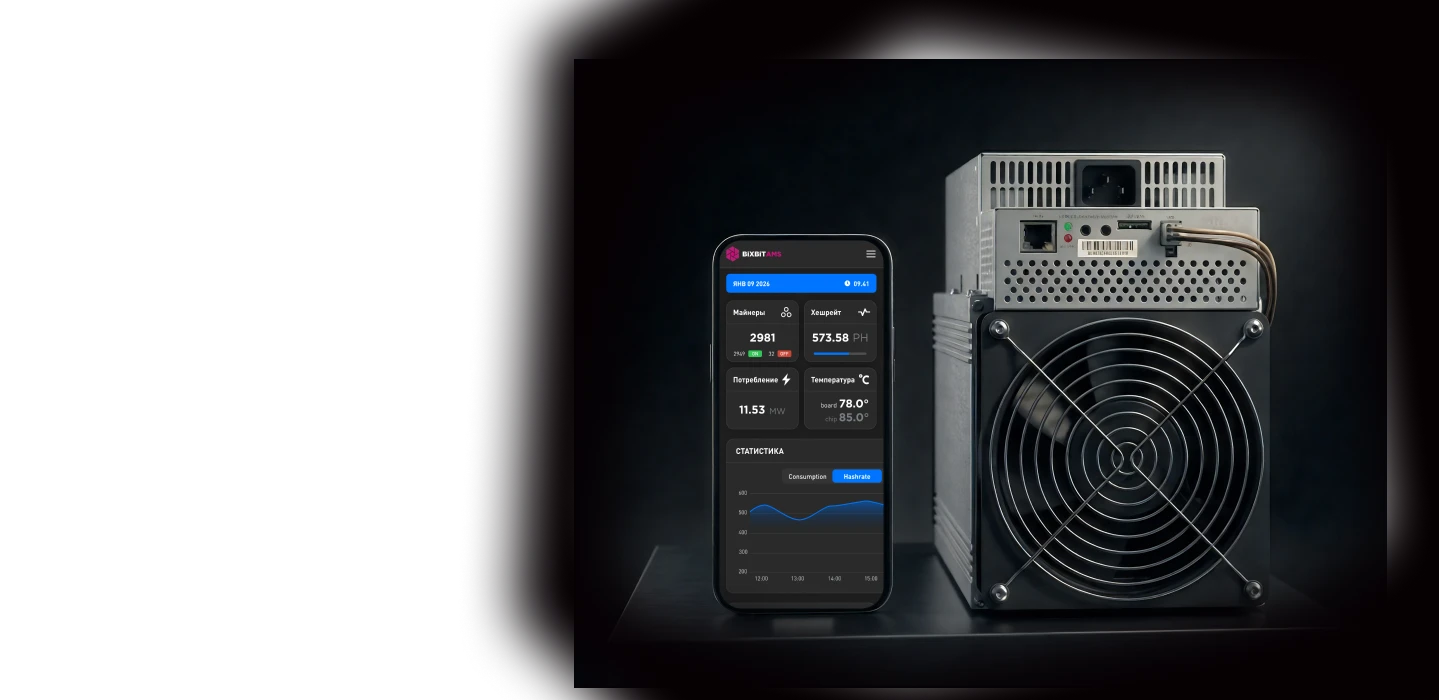
Charts, logs, temperature — all from your phone and Telegram bot