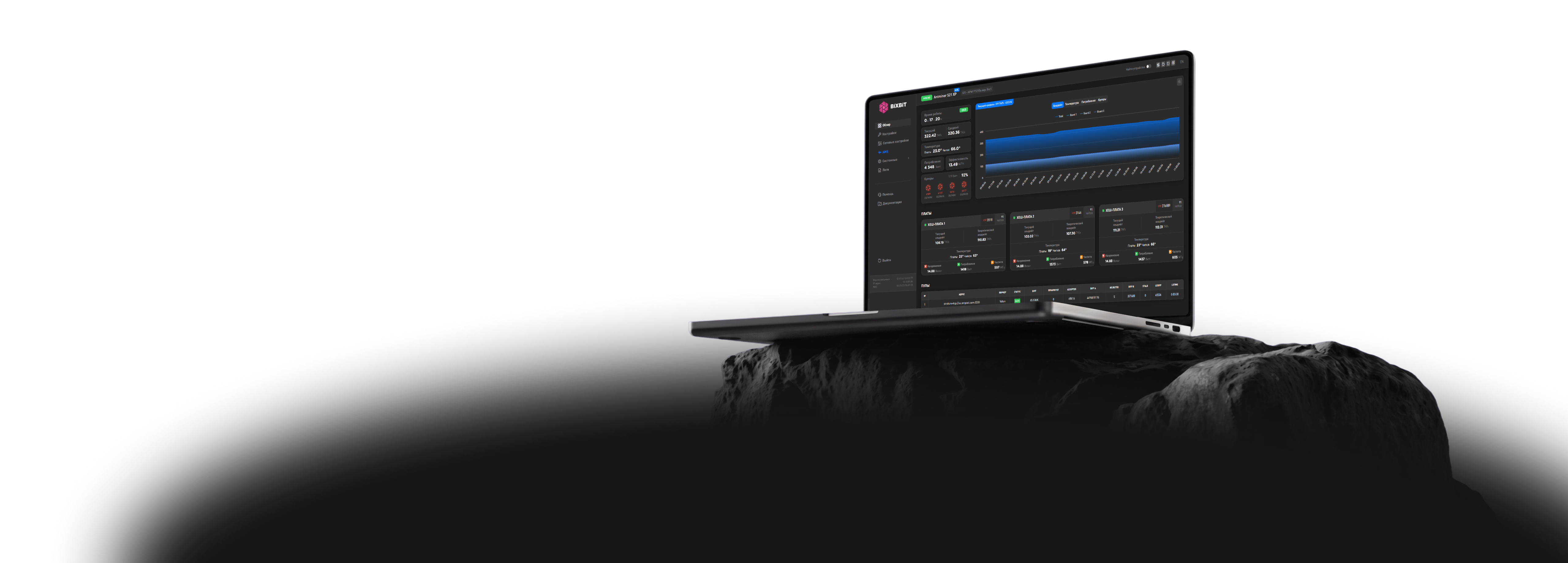
BiXBiT custom firmware dashboard for Antminer S21 โ€” hashrate, temperature and board monitoring

S21, S19, T21, T19, L9, L7 series

BiXBiT custom firmware for Antminer

Increase mining profitability with intelligent ASIC tuning, flexible performance management, and advanced BiXBiT firmware features.

  • +40%higher hashrate
  • up to 35%lower energy costs
  • 30 daysfree trial
  • 24/7technical support

Stock vs BiXBiT

Request a partner version
[01/07]
Stock problem

Devices often operate inefficiently

Stock firmware uses uniform frequency and voltage settings for all ASIC chips, despite differences in their characteristics. This leads to excessive power consumption, reduced hashrate, and accelerated equipment degradation.

BiXBiT solution

Autotune

The autotune mechanism analyzes the efficiency of each chip and automatically selects the optimal operating profile for the device โ€” an optimal balance of hashrate and power consumption. This reduces the load on the hardware and ensures stable operation of the ASIC without the need for manual configuration.
[02/07]
Stock problem

Limited operating profiles

Limited profile selection options in stock firmware do not allow ASIC operation to be adapted to current operating conditions, leading to lost hashrate or excessive electricity costs.

BiXBiT solution

Profile generation

Generates a set of performance profiles optimized for each individual ASIC. This allows quickly selecting the optimal balance between hashrate, power consumption, and equipment operational stability.

[03/07]
Stock problem

Equipment overheating

Standard overheating protection does not always prevent emergency ASIC shutdowns, leading to equipment downtime, risk of chip damage, and additional repair costs.

BiXBiT solution

Profile Switcher

After setting the minimum, maximum, and target chip temperature, the firmware automatically switches the ASIC between profiles, maintaining the set temperature and preventing equipment overheating without manual intervention.

[04/07]
Stock problem

Unstable operation due to chip wear

The failure of even a single chip in an ASIC running stock firmware can lead to endless device restart attempts or complete shutdown. As a result, the equipment loses hashrate, sits idle, and stops generating income until the fault is fixed.

BiXBiT solution

Handling problematic chips

The firmware detects defective or degraded chips, allowing the ASIC to continue operating. Defective chips are bypassed, while the remaining chips are automatically assigned optimal operating parameters, ensuring stable hashrate without the need for immediate repair.

[05/07]
Stock problem

Limitations of standard profiles

The stock firmware uses fixed settings for each hash board and does not take into account changes in operating conditions during the day, which is why the ASIC operates outside the optimal mode.

BiXBiT solution

Adaptive tuning

The user sets an interval for periodic diagnostics of each chip's condition and ambient temperature and operating conditions. Based on the data obtained, the ASIC dynamically adjusts frequency and voltage, adapting to changing operating conditions and maintaining the maximum possible hashrate without loss of stability.

[06/07]
Stock problem

One failure โ€” complete device shutdown

The failure of one hash board in stock firmware stops the operation of the entire ASIC, even if the other boards are fully functional. This leads to equipment downtime and loss of income until repair is completed.

BiXBiT solution

Mining with Failed Hash Boards

The firmware allows the failed hash board to be disabled while mining continues on the remaining functional boards, keeping the equipment operational until repair. The faulty board is excluded from operation, and the remaining boards undergo auto-tuning and continue mining with optimal parameters.

[07/07]
Stock problem

Traffic blocking and unstable connection

Stock firmware does not provide built-in tools to ensure a stable connection to mining pools. As a result, with an unstable connection or traffic limitation, equipment may lose connection to the pool, leading to downtime and income loss.

BiXBiT solution

Reliable Mining Through Proxy

BiXBiT Farm Protect connects mining devices to the pool via a separate route through a proxy server. This increases privacy and connection stability, reduces traffic volume, and lowers the load on network equipment.

Only with BiXBiT partners access

Latest stock firmware installationCV control boards firmware persistence

BiXBiT firmware โ€” access to a complete mining ecosystem

Get access to the BiXBiT ecosystem: remote monitoring for ASIC and built-in Farm Protect security for stable and safe equipment operation.

Open access to the BiXBiT AMS monitoring system

Bulk Device Management
Profit analysis and device status tracking
Remote access from anywhere in the world

Open access to BiXBiT FARM PROTECT

Stable connection
Secure connection
Traffic savings

Transparent
Pricing

Test the firmware on your equipment. Assess the increase in efficiency and stability risk-free.

Usage Cost

2.8%

of the total hashrate mined by the device

Control board for Antminer + BiXBiT firmware

Our control board for Antminer devices, with pre-installed BiXBiT firmware, is designed to improve mining stability and maximize ASIC efficiency.

Learn about the terms
  • Quick installation
  • Secure boot โ€” protection against overheating and virus attacks
  • Maximum hashrate โ€” auto-tuning for each chip
  • Energy savings โ€” lower consumption, higher profitability
  • Stable operation with enhanced efficiency modes

Choose your Antminer model

We will select the appropriate version of BiXBiT firmware for your ASIC. We support all Antminer models. If you didn't find your model in the list โ€” contact us.

Contact the BiXBiT team

For any questions and partnership inquiries.

or

Choose your model. Get your firmware.

Fast and ready to download.

Model*
20+ countriesClients in: UAE, Spain, Brazil, USA, Canada, and others
10 yearsof experience in mining solutions and the server sector
56 000+ASICs optimized for maximum performance
200+ MWof successful projects based on liquid cooling

Partnership terms

For hosting providers, service companies, integrators and resellers of mining solutions

Get special partnership terms, technical support, and additional opportunities to grow your business within the BiXBiT ecosystem.

  • Reduced Dev Fee percentage
  • Adjustable Hotel Fee
  • Interface branding (White Label)
  • Custom feature development on request
  • Bulk remote installation for Whatsminer and Antminer
  • Custom API provision
  • Early access to updates
  • Priority 24/7 technical support
  • Dedicated personal manager
  • Joint business development and marketing support
Become a partner

FAQ

How do I enter pools on Antminer?

Go to Settings โ†’ Pools in the Antminer firmware and enter the pool address, worker name, and password. After saving the settings, the miner will start connecting to the selected pool.

How do I connect Antminer to the AMS system?

Open the AMS section in the Antminer firmware and enter the connection details. After that, the device will appear in the AMS control panel.

How do I choose a profile on Antminer?

Go to Settings โ†’ Autotune in the Antminer firmware. Here you can select one of the built-in profiles or generate a custom set of profiles for your specific device using the Generate profiles button.

How do I generate profiles on Antminer?

Go to Settings โ†’ Autotune and click Generate profiles โ€” the system will build a set of profiles based on the device's current parameters. If profiles were already generated earlier and operating conditions have since changed, run generation again using the Regenerate profiles button.

How do I enable liquid cooling mode on Antminer?

Once the device is submerged in cooling fluid, go to Settings โ†’ Setup in the Antminer firmware and turn on the Liquid cooling parameter. After saving the settings, the miner will operate with liquid cooling taken into account.

How do I set up automatic profile switching based on device temperature?

Go to Settings โ†’ Profile Switcher. Set the maximum profile the device can automatically switch to, and the temperature thresholds at which the profile will switch up or down.

How do I download logs from Antminer?

Go to Miner Log โ†’ Download in the Antminer firmware and select the required time period. The log archive will be saved to the device.

How do I check Antminer's connection to the pool?

The pool connection status is shown on the Dashboard tab: Alive โ€” connection established, Dead โ€” no connection. Connection attempts and any errors can be viewed in the Miner Log section.

BiXBiT firmware support team

Still have questions?

Contact us via Telegram! Our team of technicians is always available 24/7 and ready to help.

  • For technical questions about installation, setup, and operation of the firmware, choose โ€œTechnical Supportโ€.
  • For commercial inquiries, partnership, and connection terms, choose โ€œCommerceโ€.