1.
Download BiXBiT firmware for Whatsminer
'%3e%3cpath%20stroke='%23fff'%20stroke-width='.3'%20d='M3.83%204.108%209.891.6l2.64%201.525v7.007zM.15%2013.211V6.236l2.677-1.549%206.044%203.49zm6.058%207.702L.15%2017.443v-3.075l6.058-3.497zm9.712-1.382-6.038%203.485-2.671-1.53v-6.983zm3.672-2.118-2.669%201.54-6.049-3.492%208.718-5.034zm.001-11.209V9.27l-6.058%203.498V2.704zm-9.72%202.551%202.658%201.535v3.056l-2.66%201.536-2.66-1.536v-3.053z'/%3e%3cpath%20d='M24.273%2017.496V6.192h5.936q2.115%200%203.158%201.017.744.728.744%201.857%200%201.76-1.785%202.519%201.124.354%201.712%201.017t.587%201.775q0%201.454-1.158%202.285-1.157.83-3.224.834zm3.125-2.518h2.48q1.537%200%201.538-1.066%200-1.017-1.571-1.017h-2.446zm0-4.279h2.018q1.52%200%201.52-1.017%200-.968-1.454-.968h-2.084zm8.582%206.797V8.762h3.14v8.734zm-.067-9.525V6.195h3.274V7.97zm4.297%209.525%203.966-5.747-3.802-5.553h3.69l2.05%203.181%202.066-3.18h3.605l-3.802%205.52%203.966%205.78h-3.685l-2.216-3.406-2.232%203.406zm12.946%200V6.192h5.935q2.115%200%203.158%201.017.744.728.744%201.857%200%201.76-1.785%202.519%201.124.354%201.712%201.017t.587%201.775q0%201.454-1.157%202.285-1.157.83-3.224.832zm3.125-2.518h2.48q1.538%200%201.538-1.066%200-1.017-1.57-1.017h-2.447zm0-4.279h2.017q1.52%200%201.52-1.017%200-.968-1.454-.968h-2.081zm8.58%206.797V8.762h3.141v8.734zm-.067-9.525V6.195h3.274V7.97zm7.972%209.525V8.939h-3.471V6.195h10.151v2.744h-3.472v8.557z'/%3e%3c/g%3e%3cdefs%3e%3cclipPath%20id='a'%3e%3cpath%20fill='%23fff'%20d='M0%200h80v24H0z'/%3e%3c/clipPath%3e%3c/defs%3e%3c/svg%3e)
Alternative firmware for Whatsminer M5x series is designed for all models and allows you to overclock ASIC up depending on the configuration.
'%3e%3crect%20width='48'%20height='48'%20x='1'%20y='1'%20fill='%23fff'%20rx='2'/%3e%3cpath%20stroke='%23d9017a'%20stroke-linecap='round'%20stroke-linejoin='round'%20stroke-width='2'%20d='M25%2015v4m4.2%201.798%202.9-2.9M31%2025h4m-5.8%204.203%202.9%202.9M25%2031v4m-7.102-2.897%202.9-2.9M15%2025h4m-1.102-7.102%202.9%202.9'/%3e%3cpath%20stroke='%23d9017a'%20stroke-width='2'%20d='M1%209V3a2%202%200%200%201%202-2h6m40%208V3a2%202%200%200%200-2-2h-6M1%2041v6a2%202%200%200%200%202%202h6m40-8v6a2%202%200%200%201-2%202h-6'/%3e%3c/g%3e%3cdefs%3e%3cfilter%20id='a'%20width='50'%20height='50'%20x='0'%20y='0'%20color-interpolation-filters='sRGB'%20filterUnits='userSpaceOnUse'%3e%3cfeFlood%20flood-opacity='0'%20result='BackgroundImageFix'/%3e%3cfeBlend%20in='SourceGraphic'%20in2='BackgroundImageFix'%20result='shape'/%3e%3cfeColorMatrix%20in='SourceAlpha'%20result='hardAlpha'%20values='0%200%200%200%200%200%200%200%200%200%200%200%200%200%200%200%200%200%20127%200'/%3e%3cfeOffset/%3e%3cfeGaussianBlur%20stdDeviation='3'/%3e%3cfeComposite%20in2='hardAlpha'%20k2='-1'%20k3='1'%20operator='arithmetic'/%3e%3cfeColorMatrix%20values='0%200%200%200%200.85098%200%200%200%200%200.00392157%200%200%200%200%200.478431%200%200%200%201%200'/%3e%3cfeBlend%20in2='shape'%20result='effect1_innerShadow_2439_13101'/%3e%3c/filter%3e%3c/defs%3e%3c/svg%3e)
Automatic profile generation
'%3e%3crect%20width='48'%20height='48'%20x='1'%20y='1'%20fill='%23fff'%20rx='2'/%3e%3cpath%20stroke='%23d9017a'%20stroke-linecap='round'%20stroke-linejoin='round'%20stroke-width='2'%20d='M33%2027h-4a2%202%200%200%200-2%202v4a2%202%200%200%200%202%202h4a2%202%200%200%200%202-2v-4a2%202%200%200%200-2-2M21%2015h-4a2%202%200%200%200-2%202v4a2%202%200%200%200%202%202h4a2%202%200%200%200%202-2v-4a2%202%200%200%200-2-2m-1%2012v1a2%202%200%200%200%202%202h1m4-10h1a2%202%200%200%201%202%202v1'/%3e%3cpath%20stroke='%23d9017a'%20stroke-width='2'%20d='M1%209V3a2%202%200%200%201%202-2h6m40%208V3a2%202%200%200%200-2-2h-6M1%2041v6a2%202%200%200%200%202%202h6m40-8v6a2%202%200%200%201-2%202h-6'/%3e%3c/g%3e%3cdefs%3e%3cfilter%20id='a'%20width='50'%20height='50'%20x='0'%20y='0'%20color-interpolation-filters='sRGB'%20filterUnits='userSpaceOnUse'%3e%3cfeFlood%20flood-opacity='0'%20result='BackgroundImageFix'/%3e%3cfeBlend%20in='SourceGraphic'%20in2='BackgroundImageFix'%20result='shape'/%3e%3cfeColorMatrix%20in='SourceAlpha'%20result='hardAlpha'%20values='0%200%200%200%200%200%200%200%200%200%200%200%200%200%200%200%200%200%20127%200'/%3e%3cfeOffset/%3e%3cfeGaussianBlur%20stdDeviation='3'/%3e%3cfeComposite%20in2='hardAlpha'%20k2='-1'%20k3='1'%20operator='arithmetic'/%3e%3cfeColorMatrix%20values='0%200%200%200%200.85098%200%200%200%200%200.00392157%200%200%200%200%200.478431%200%200%200%201%200'/%3e%3cfeBlend%20in2='shape'%20result='effect1_innerShadow_2912_15086'/%3e%3c/filter%3e%3c/defs%3e%3c/svg%3e)
Profile Switcher
'%3e%3crect%20width='48'%20height='48'%20x='1'%20y='1'%20fill='%23fff'%20rx='2'/%3e%3cpath%20stroke='%23d9017a'%20stroke-width='2'%20d='M1%209V3a2%202%200%200%201%202-2h6m40%208V3a2%202%200%200%200-2-2h-6M1%2041v6a2%202%200%200%200%202%202h6m40-8v6a2%202%200%200%201-2%202h-6'/%3e%3cpath%20stroke='%23d9017a'%20stroke-linecap='round'%20stroke-linejoin='round'%20stroke-width='2'%20d='M25%2033v2m0-20v2m5%2016v2m0-20v2m-15%208h2m-2%205h2m-2-10h2m16%205h2m-2%205h2m-2-10h2M20%2033v2m0-20v2m11%200H19a2%202%200%200%200-2%202v12a2%202%200%200%200%202%202h12a2%202%200%200%200%202-2V19a2%202%200%200%200-2-2'/%3e%3cpath%20stroke='%23d9017a'%20stroke-linecap='round'%20stroke-linejoin='round'%20stroke-width='2'%20d='M28%2021h-6a1%201%200%200%200-1%201v6a1%201%200%200%200%201%201h6a1%201%200%200%200%201-1v-6a1%201%200%200%200-1-1'/%3e%3c/g%3e%3cdefs%3e%3cfilter%20id='a'%20width='50'%20height='50'%20x='0'%20y='0'%20color-interpolation-filters='sRGB'%20filterUnits='userSpaceOnUse'%3e%3cfeFlood%20flood-opacity='0'%20result='BackgroundImageFix'/%3e%3cfeBlend%20in='SourceGraphic'%20in2='BackgroundImageFix'%20result='shape'/%3e%3cfeColorMatrix%20in='SourceAlpha'%20result='hardAlpha'%20values='0%200%200%200%200%200%200%200%200%200%200%200%200%200%200%200%200%200%20127%200'/%3e%3cfeOffset/%3e%3cfeGaussianBlur%20stdDeviation='3'/%3e%3cfeComposite%20in2='hardAlpha'%20k2='-1'%20k3='1'%20operator='arithmetic'/%3e%3cfeColorMatrix%20values='0%200%200%200%200.85098%200%200%200%200%200.00392157%200%200%200%200%200.478431%200%200%200%201%200'/%3e%3cfeBlend%20in2='shape'%20result='effect1_innerShadow_2439_13135'/%3e%3c/filter%3e%3c/defs%3e%3c/svg%3e)
Hashboards disabling
'%3e%3crect%20width='48'%20height='48'%20x='1'%20y='1'%20fill='%23fff'%20rx='2'/%3e%3cpath%20stroke='%23d9017a'%20stroke-width='2'%20d='M1%209V3a2%202%200%200%201%202-2h6m40%208V3a2%202%200%200%200-2-2h-6M1%2041v6a2%202%200%200%200%202%202h6m40-8v6a2%202%200%200%201-2%202h-6'/%3e%3cpath%20stroke='%23d9017a'%20stroke-linecap='round'%20stroke-linejoin='round'%20stroke-width='2'%20d='M31%2021v-2a2%202%200%200%200-2-2H17a2%202%200%200%200-2%202v7a2%202%200%200%200%202%202h8m-2%204v-3.96%203.15M20%2032h5m8-7h-2a2%202%200%200%200-2%202v6a2%202%200%200%200%202%202h2a2%202%200%200%200%202-2v-6a2%202%200%200%200-2-2'/%3e%3c/g%3e%3cdefs%3e%3cfilter%20id='a'%20width='50'%20height='50'%20x='0'%20y='0'%20color-interpolation-filters='sRGB'%20filterUnits='userSpaceOnUse'%3e%3cfeFlood%20flood-opacity='0'%20result='BackgroundImageFix'/%3e%3cfeBlend%20in='SourceGraphic'%20in2='BackgroundImageFix'%20result='shape'/%3e%3cfeColorMatrix%20in='SourceAlpha'%20result='hardAlpha'%20values='0%200%200%200%200%200%200%200%200%200%200%200%200%200%200%200%200%200%20127%200'/%3e%3cfeOffset/%3e%3cfeGaussianBlur%20stdDeviation='3'/%3e%3cfeComposite%20in2='hardAlpha'%20k2='-1'%20k3='1'%20operator='arithmetic'/%3e%3cfeColorMatrix%20values='0%200%200%200%200.85098%200%200%200%200%200.00392157%200%200%200%200%200.478431%200%200%200%201%200'/%3e%3cfeBlend%20in2='shape'%20result='effect1_innerShadow_2439_13170'/%3e%3c/filter%3e%3c/defs%3e%3c/svg%3e)
Remote monitoring
'%3e%3crect%20width='48'%20height='48'%20fill='%23fff'%20rx='2'/%3e%3cpath%20stroke='%23d9017a'%20stroke-linecap='round'%20stroke-linejoin='round'%20stroke-width='2'%20d='M23%2027h2a2%202%200%200%200%200-4h-3c-.6%200-1.1.2-1.4.6L15%2029'/%3e%3cpath%20stroke='%23d9017a'%20stroke-linecap='round'%20stroke-linejoin='round'%20stroke-width='2'%20d='m19%2032.994%201.6-1.4c.3-.4.8-.6%201.4-.6h4c1.1%200%202.1-.4%202.8-1.2l4.6-4.4a2.002%202.002%200%200%200-2.75-2.91l-4.2%203.9M14%2028l6%206'/%3e%3cpath%20stroke='%23d9017a'%20stroke-linecap='round'%20stroke-linejoin='round'%20stroke-width='2'%20d='M28.002%2023.902a2.9%202.9%200%201%200%200-5.8%202.9%202.9%200%200%200%200%205.8M18%2020a3%203%200%201%200%200-6%203%203%200%200%200%200%206'/%3e%3cpath%20stroke='%23d9017a'%20stroke-width='2'%20d='M0%208V2a2%202%200%200%201%202-2h6m40%208V2a2%202%200%200%200-2-2h-6M0%2040v6a2%202%200%200%200%202%202h6m40-8v6a2%202%200%200%201-2%202h-6'/%3e%3c/g%3e%3cdefs%3e%3cfilter%20id='a'%20width='50'%20height='50'%20x='-1'%20y='-1'%20color-interpolation-filters='sRGB'%20filterUnits='userSpaceOnUse'%3e%3cfeFlood%20flood-opacity='0'%20result='BackgroundImageFix'/%3e%3cfeBlend%20in='SourceGraphic'%20in2='BackgroundImageFix'%20result='shape'/%3e%3cfeColorMatrix%20in='SourceAlpha'%20result='hardAlpha'%20values='0%200%200%200%200%200%200%200%200%200%200%200%200%200%200%200%200%200%20127%200'/%3e%3cfeOffset/%3e%3cfeGaussianBlur%20stdDeviation='3'/%3e%3cfeComposite%20in2='hardAlpha'%20k2='-1'%20k3='1'%20operator='arithmetic'/%3e%3cfeColorMatrix%20values='0%200%200%200%200.85098%200%200%200%200%200.00392157%200%200%200%200%200.478431%200%200%200%201%200'/%3e%3cfeBlend%20in2='shape'%20result='effect1_innerShadow_2439_13157'/%3e%3c/filter%3e%3c/defs%3e%3c/svg%3e)
Hotel fee
'%3e%3crect%20width='48'%20height='48'%20x='1'%20y='1'%20fill='%23fff'%20rx='2'/%3e%3cpath%20stroke='%23d9017a'%20stroke-linecap='round'%20stroke-linejoin='round'%20stroke-width='2'%20d='M33%2027H17a2%202%200%200%200-2%202v4a2%202%200%200%200%202%202h16a2%202%200%200%200%202-2v-4a2%202%200%200%200-2-2m-13.99%204H19m4.01%200H23m5-8v4m2.84-6.83a4%204%200%200%200-5.66%200m8.48-2.83a8%208%200%200%200-11.31%200'/%3e%3cpath%20stroke='%23d9017a'%20stroke-width='2'%20d='M1%209V3a2%202%200%200%201%202-2h6m40%208V3a2%202%200%200%200-2-2h-6M1%2041v6a2%202%200%200%200%202%202h6m40-8v6a2%202%200%200%201-2%202h-6'/%3e%3c/g%3e%3cdefs%3e%3cfilter%20id='a'%20width='50'%20height='50'%20x='0'%20y='0'%20color-interpolation-filters='sRGB'%20filterUnits='userSpaceOnUse'%3e%3cfeFlood%20flood-opacity='0'%20result='BackgroundImageFix'/%3e%3cfeBlend%20in='SourceGraphic'%20in2='BackgroundImageFix'%20result='shape'/%3e%3cfeColorMatrix%20in='SourceAlpha'%20result='hardAlpha'%20values='0%200%200%200%200%200%200%200%200%200%200%200%200%200%200%200%200%200%20127%200'/%3e%3cfeOffset/%3e%3cfeGaussianBlur%20stdDeviation='3'/%3e%3cfeComposite%20in2='hardAlpha'%20k2='-1'%20k3='1'%20operator='arithmetic'/%3e%3cfeColorMatrix%20values='0%200%200%200%200.85098%200%200%200%200%200.00392157%200%200%200%200%200.478431%200%200%200%201%200'/%3e%3cfeBlend%20in2='shape'%20result='effect1_innerShadow_2439_13182'/%3e%3c/filter%3e%3c/defs%3e%3c/svg%3e)
Proxy server
'%3e%3crect%20width='48'%20height='48'%20x='1'%20y='1'%20fill='%23fff'%20rx='2'/%3e%3cpath%20stroke='%23d9017a'%20stroke-width='2'%20d='M1%209V3a2%202%200%200%201%202-2h6m40%208V3a2%202%200%200%200-2-2h-6M1%2041v6a2%202%200%200%200%202%202h6m40-8v6a2%202%200%200%201-2%202h-6'/%3e%3cpath%20stroke='%23d9017a'%20stroke-linecap='round'%20stroke-linejoin='round'%20stroke-width='2'%20d='m24%2020-3%205h4l-3%205m5.856-11H29a2%202%200%200%201%202%202v8a2%202%200%200%201-2%202h-2.935M35%2027v-4m-16.86%208H17a2%202%200%200%201-2-2v-8a2%202%200%200%201%202-2h2.936'/%3e%3c/g%3e%3cdefs%3e%3cfilter%20id='a'%20width='50'%20height='50'%20x='0'%20y='0'%20color-interpolation-filters='sRGB'%20filterUnits='userSpaceOnUse'%3e%3cfeFlood%20flood-opacity='0'%20result='BackgroundImageFix'/%3e%3cfeBlend%20in='SourceGraphic'%20in2='BackgroundImageFix'%20result='shape'/%3e%3cfeColorMatrix%20in='SourceAlpha'%20result='hardAlpha'%20values='0%200%200%200%200%200%200%200%200%200%200%200%200%200%200%200%200%200%20127%200'/%3e%3cfeOffset/%3e%3cfeGaussianBlur%20stdDeviation='3'/%3e%3cfeComposite%20in2='hardAlpha'%20k2='-1'%20k3='1'%20operator='arithmetic'/%3e%3cfeColorMatrix%20values='0%200%200%200%200.85098%200%200%200%200%200.00392157%200%200%200%200%200.478431%200%200%200%201%200'/%3e%3cfeBlend%20in2='shape'%20result='effect1_innerShadow_2912_15074'/%3e%3c/filter%3e%3c/defs%3e%3c/svg%3e)
Additional PSU
'%3e%3crect%20width='48'%20height='48'%20x='1'%20y='1'%20fill='%23fff'%20rx='2'/%3e%3cpath%20stroke='%23d9017a'%20stroke-linecap='round'%20stroke-linejoin='round'%20stroke-width='2'%20d='M20%2029.297c2.2%200%204-1.83%204-4.05%200-1.16-.57-2.26-1.71-3.19s-2-2.31-2.29-3.76a6.6%206.6%200%200%201-2.29%203.76c-1.15.92-1.71%202.04-1.71%203.19%200%202.22%201.8%204.05%204%204.05'/%3e%3cpath%20stroke='%23d9017a'%20stroke-linecap='round'%20stroke-linejoin='round'%20stroke-width='2'%20d='M25.56%2019.596a11%2011%200%200%200%201.44-3.58c.5%202.5%202%204.9%204%206.5s3%203.5%203%205.5a6.98%206.98%200%200%201-11.91%204.97'/%3e%3cpath%20stroke='%23d9017a'%20stroke-width='2'%20d='M1%209V3a2%202%200%200%201%202-2h6m40%208V3a2%202%200%200%200-2-2h-6M1%2041v6a2%202%200%200%200%202%202h6m40-8v6a2%202%200%200%201-2%202h-6'/%3e%3c/g%3e%3cdefs%3e%3cfilter%20id='a'%20width='50'%20height='50'%20x='0'%20y='0'%20color-interpolation-filters='sRGB'%20filterUnits='userSpaceOnUse'%3e%3cfeFlood%20flood-opacity='0'%20result='BackgroundImageFix'/%3e%3cfeBlend%20in='SourceGraphic'%20in2='BackgroundImageFix'%20result='shape'/%3e%3cfeColorMatrix%20in='SourceAlpha'%20result='hardAlpha'%20values='0%200%200%200%200%200%200%200%200%200%200%200%200%200%200%200%200%200%20127%200'/%3e%3cfeOffset/%3e%3cfeGaussianBlur%20stdDeviation='3'/%3e%3cfeComposite%20in2='hardAlpha'%20k2='-1'%20k3='1'%20operator='arithmetic'/%3e%3cfeColorMatrix%20values='0%200%200%200%200.85098%200%200%200%200%200.00392157%200%200%200%200%200.478431%200%200%200%201%200'/%3e%3cfeBlend%20in2='shape'%20result='effect1_innerShadow_2912_15064'/%3e%3c/filter%3e%3c/defs%3e%3c/svg%3e)
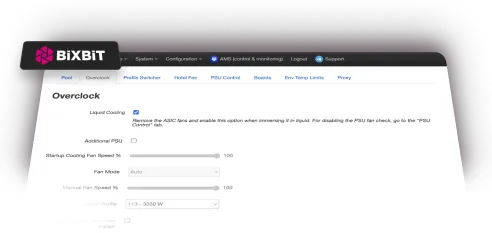
Liquid Cooling
'%3e%3crect%20width='48'%20height='48'%20x='1'%20y='1'%20fill='%23fff'%20rx='2'/%3e%3cpath%20stroke='%23d9017a'%20stroke-width='2'%20d='M1%209V3a2%202%200%200%201%202-2h6m40%208V3a2%202%200%200%200-2-2h-6M1%2041v6a2%202%200%200%200%202%202h6m40-8v6a2%202%200%200%201-2%202h-6'/%3e%3cpath%20stroke='%23d9017a'%20stroke-linecap='round'%20stroke-linejoin='round'%20stroke-width='2'%20d='M17%2027a1%201%200%200%201-.78-1.63l9.9-10.2a.5.5%200%200%201%20.86.46l-1.92%206.02A1%201%200%200%200%2026%2023h7a1%201%200%200%201%20.78%201.63l-9.9%2010.2a.5.5%200%200%201-.86-.46l1.92-6.02A1%201%200%200%200%2024%2027z'/%3e%3c/g%3e%3cdefs%3e%3cfilter%20id='a'%20width='50'%20height='50'%20x='0'%20y='0'%20color-interpolation-filters='sRGB'%20filterUnits='userSpaceOnUse'%3e%3cfeFlood%20flood-opacity='0'%20result='BackgroundImageFix'/%3e%3cfeBlend%20in='SourceGraphic'%20in2='BackgroundImageFix'%20result='shape'/%3e%3cfeColorMatrix%20in='SourceAlpha'%20result='hardAlpha'%20values='0%200%200%200%200%200%200%200%200%200%200%200%200%200%200%200%200%200%20127%200'/%3e%3cfeOffset/%3e%3cfeGaussianBlur%20stdDeviation='3'/%3e%3cfeComposite%20in2='hardAlpha'%20k2='-1'%20k3='1'%20operator='arithmetic'/%3e%3cfeColorMatrix%20values='0%200%200%200%200.85098%200%200%200%200%200.00392157%200%200%200%200%200.478431%200%200%200%201%200'/%3e%3cfeBlend%20in2='shape'%20result='effect1_innerShadow_2439_13126'/%3e%3c/filter%3e%3c/defs%3e%3c/svg%3e)
Downvolting
Automatically deducted during mining
 Whatsminer_ M5x
Download BiXBiT firmware for Whatsminer
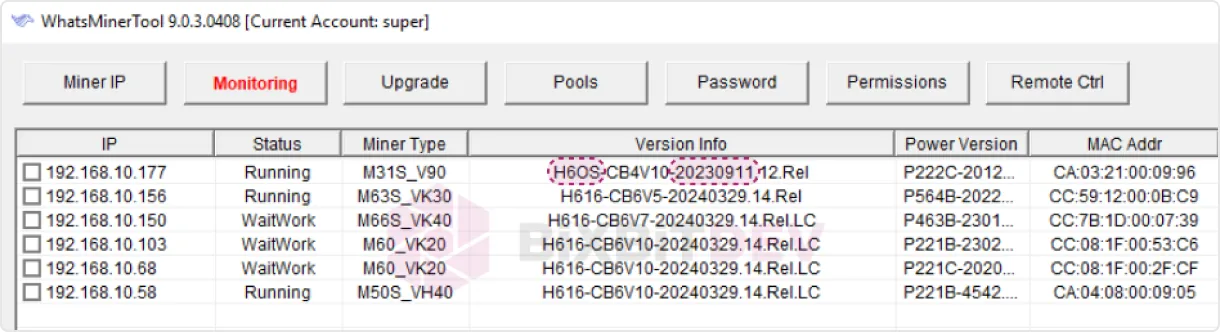
or by checking the Status -> Overview tab in the ASIC web interface:
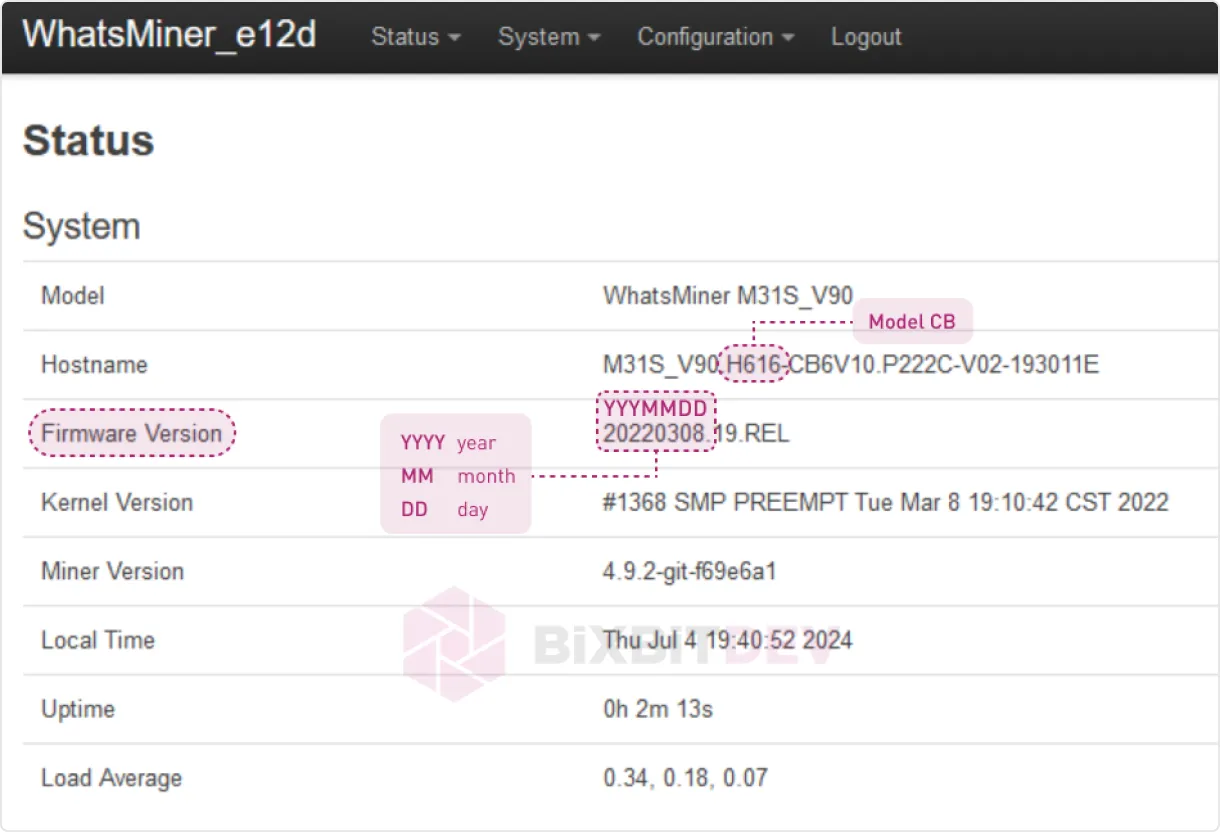
If your device has a control board H616
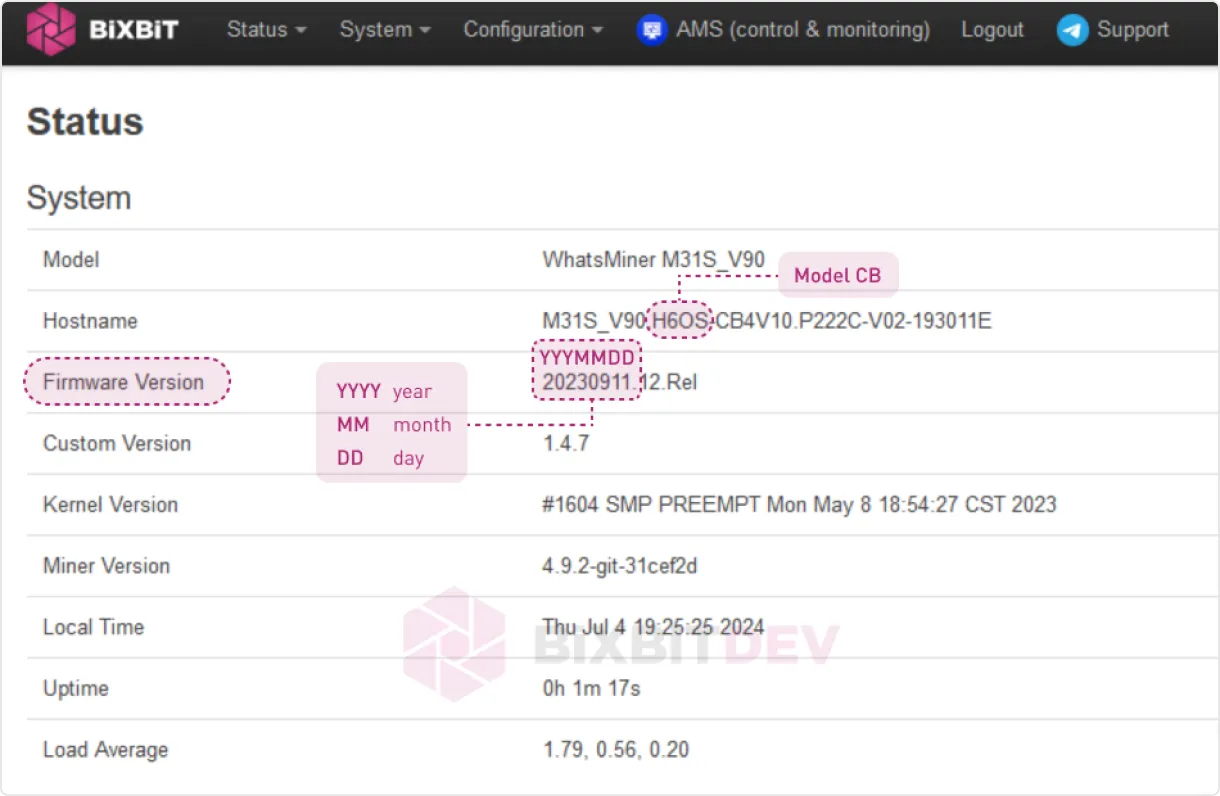
use WhatsminerTool to install the firmware by uploading the file «Whatsminer-ALL-Models_X.X.X.bin», where «Х.Х.Х» - is the firmware version.
If your device has a control board H616 and the firmware version is before December 13, 2023 or if BiXBiT firmware is already installed:
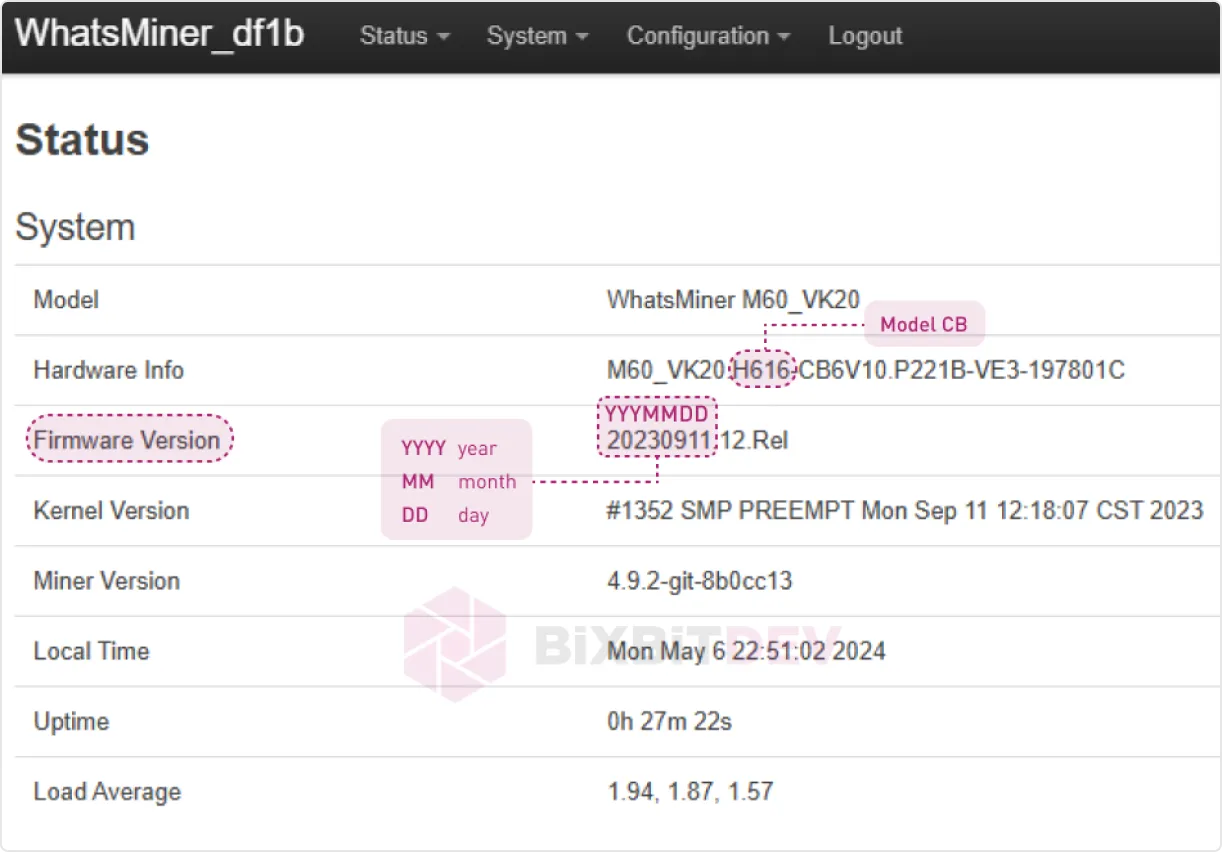
use WhatsminerTool to install the firmware by uploading the file «Whatsminer-ALL-Models_X.X.X_h616-before20231213.bin», where «Х.Х.Х» - is the firmware version.
If your device has a control board H616 and the firmware version is after December 13, 2023:
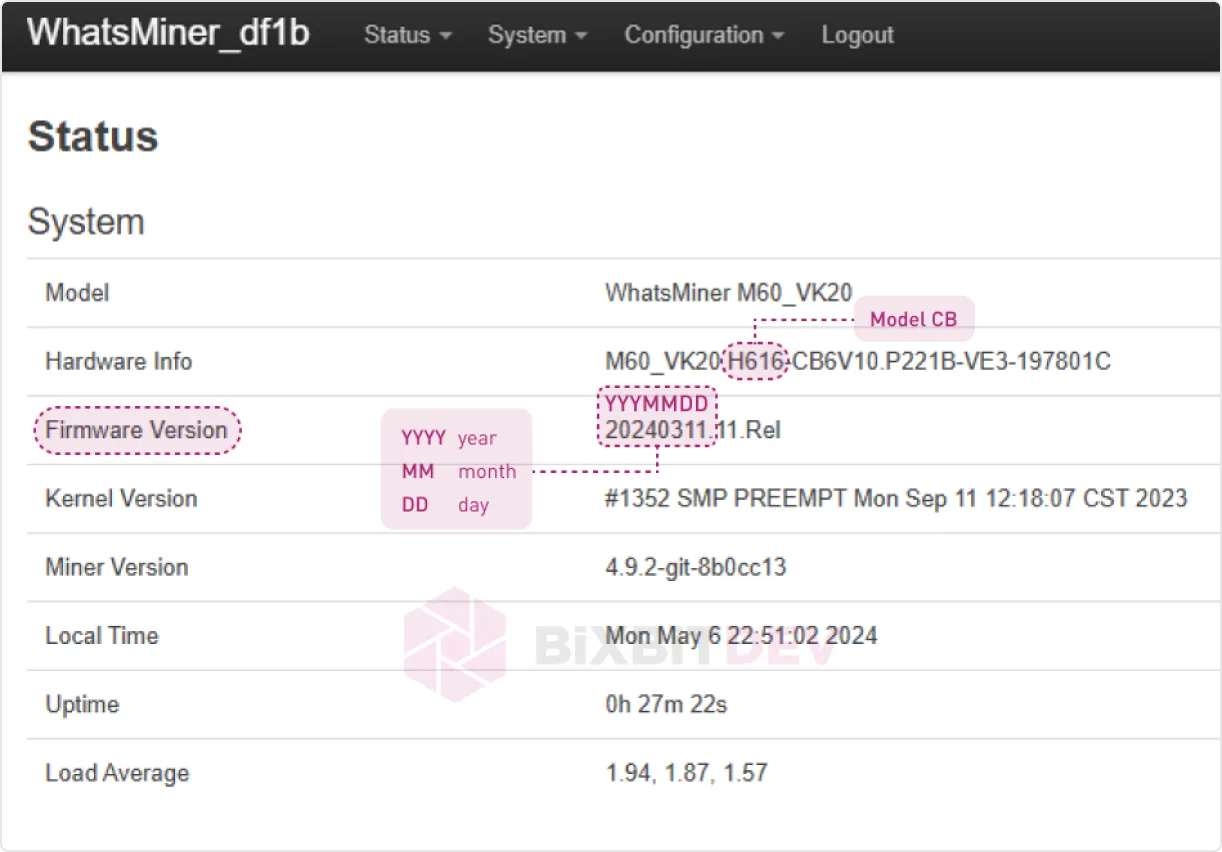
use the firmware image «Whatsminer-ALL-Models_Х.Х.Х_h616-after20231213.img » and the PhoenixCard utility to write the intermediate firmware version to an SD card. Then use the SD card to flash your device to the intermediate firmware version. The detailed process of flashing ASIC via SD card is shown in the video. After installing the intermediate firmware version, update your ASIC to the latest BiXBiT firmware usingWhatsminerToolwith the file «Whatsminer-ALL-Models_X.X.X.bin».
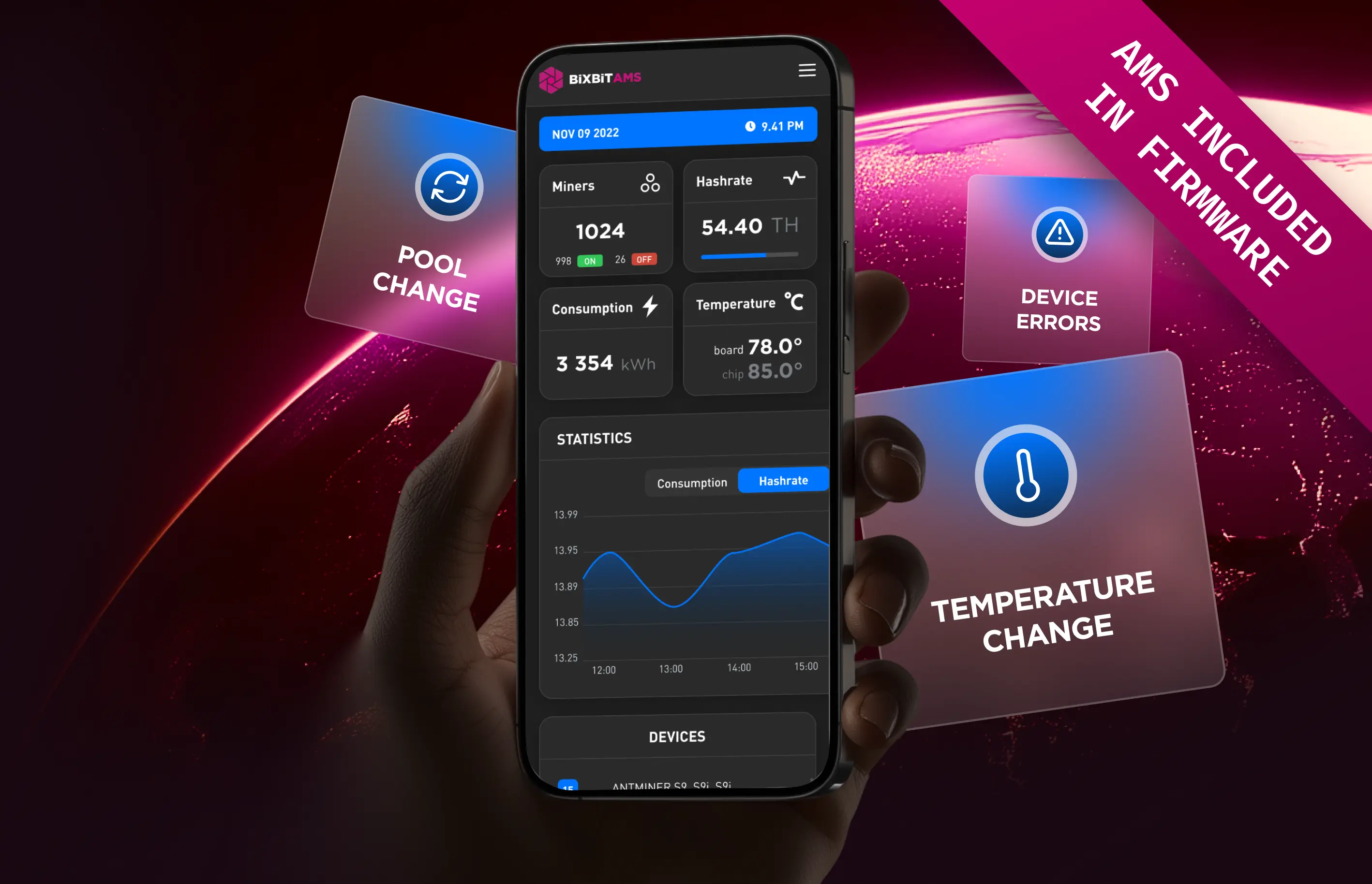
Real-time statistics, main control functions and flexible notifications are now available as a single online service
'%3e%3crect%20width='48'%20height='48'%20x='1'%20y='1'%20fill='%23291923'%20rx='2'/%3e%3cpath%20stroke='%23fff'%20stroke-linecap='round'%20stroke-linejoin='round'%20stroke-width='2'%20d='M31%2034a3%203%200%201%200%200-6%203%203%200%200%200%200%206M19%2022a3%203%200%201%200%200-6%203%203%200%200%200%200%206m7-3h3a2%202%200%200%201%202%202v7m-7%203h-3a2%202%200%200%201-2-2v-7'/%3e%3cpath%20stroke='%23fff'%20stroke-width='2'%20d='M1%209V3a2%202%200%200%201%202-2h6m40%208V3a2%202%200%200%200-2-2h-6M1%2041v6a2%202%200%200%200%202%202h6m40-8v6a2%202%200%200%201-2%202h-6'/%3e%3c/g%3e%3cdefs%3e%3cfilter%20id='a'%20width='50'%20height='50'%20x='0'%20y='0'%20color-interpolation-filters='sRGB'%20filterUnits='userSpaceOnUse'%3e%3cfeFlood%20flood-opacity='0'%20result='BackgroundImageFix'/%3e%3cfeBlend%20in='SourceGraphic'%20in2='BackgroundImageFix'%20result='shape'/%3e%3cfeColorMatrix%20in='SourceAlpha'%20result='hardAlpha'%20values='0%200%200%200%200%200%200%200%200%200%200%200%200%200%200%200%200%200%20127%200'/%3e%3cfeOffset/%3e%3cfeGaussianBlur%20stdDeviation='3'/%3e%3cfeComposite%20in2='hardAlpha'%20k2='-1'%20k3='1'%20operator='arithmetic'/%3e%3cfeColorMatrix%20values='0%200%200%200%201%200%200%200%200%201%200%200%200%200%201%200%200%200%201%200'/%3e%3cfeBlend%20in2='shape'%20result='effect1_innerShadow_2423_5065'/%3e%3c/filter%3e%3c/defs%3e%3c/svg%3e)
Mass device management
'%3e%3crect%20width='48'%20height='48'%20x='1.25'%20y='1'%20fill='%23291923'%20rx='2'/%3e%3cpath%20stroke='%23fff'%20stroke-width='2'%20d='M1.25%209V3a2%202%200%200%201%202-2h6m40%208V3a2%202%200%200%200-2-2h-6m-40%2040v6a2%202%200%200%200%202%202h6m40-8v6a2%202%200%200%201-2%202h-6'/%3e%3cpath%20stroke='%23fff'%20stroke-linecap='round'%20stroke-linejoin='round'%20stroke-width='2'%20d='m16.25%2021%204-4%204%204m-4-4v16m12-14a2%202%200%201%200-4%200v2a2%202%200%201%200%204%200zm-2%2014v-6h-2m0%206h4'/%3e%3c/g%3e%3cdefs%3e%3cfilter%20id='a'%20width='50'%20height='50'%20x='.25'%20y='0'%20color-interpolation-filters='sRGB'%20filterUnits='userSpaceOnUse'%3e%3cfeFlood%20flood-opacity='0'%20result='BackgroundImageFix'/%3e%3cfeBlend%20in='SourceGraphic'%20in2='BackgroundImageFix'%20result='shape'/%3e%3cfeColorMatrix%20in='SourceAlpha'%20result='hardAlpha'%20values='0%200%200%200%200%200%200%200%200%200%200%200%200%200%200%200%200%200%20127%200'/%3e%3cfeOffset/%3e%3cfeGaussianBlur%20stdDeviation='3'/%3e%3cfeComposite%20in2='hardAlpha'%20k2='-1'%20k3='1'%20operator='arithmetic'/%3e%3cfeColorMatrix%20values='0%200%200%200%201%200%200%200%200%201%200%200%200%200%201%200%200%200%201%200'/%3e%3cfeBlend%20in2='shape'%20result='effect1_innerShadow_2423_5078'/%3e%3c/filter%3e%3c/defs%3e%3c/svg%3e)
Advanced device sorting and filtering
'%3e%3crect%20width='48'%20height='48'%20x='1.5'%20y='1'%20fill='%23291923'%20rx='2'/%3e%3cpath%20stroke='%23fff'%20stroke-linecap='round'%20stroke-linejoin='round'%20stroke-width='2'%20d='M24.5%2026h-4m12-4h-4m-12-6v16a2%202%200%200%200%202%202h16'/%3e%3cpath%20stroke='%23fff'%20stroke-linecap='round'%20stroke-linejoin='round'%20stroke-width='2'%20d='M31.5%2018h-2a1%201%200%200%200-1%201v10a1%201%200%200%200%201%201h2a1%201%200%200%200%201-1V19a1%201%200%200%200-1-1m-8%203h-2a1%201%200%200%200-1%201v7a1%201%200%200%200%201%201h2a1%201%200%200%200%201-1v-7a1%201%200%200%200-1-1'/%3e%3cpath%20stroke='%23fff'%20stroke-width='2'%20d='M1.5%209V3a2%202%200%200%201%202-2h6m40%208V3a2%202%200%200%200-2-2h-6m-40%2040v6a2%202%200%200%200%202%202h6m40-8v6a2%202%200%200%201-2%202h-6'/%3e%3c/g%3e%3cdefs%3e%3cfilter%20id='a'%20width='50'%20height='50'%20x='.5'%20y='0'%20color-interpolation-filters='sRGB'%20filterUnits='userSpaceOnUse'%3e%3cfeFlood%20flood-opacity='0'%20result='BackgroundImageFix'/%3e%3cfeBlend%20in='SourceGraphic'%20in2='BackgroundImageFix'%20result='shape'/%3e%3cfeColorMatrix%20in='SourceAlpha'%20result='hardAlpha'%20values='0%200%200%200%200%200%200%200%200%200%200%200%200%200%200%200%200%200%20127%200'/%3e%3cfeOffset/%3e%3cfeGaussianBlur%20stdDeviation='3'/%3e%3cfeComposite%20in2='hardAlpha'%20k2='-1'%20k3='1'%20operator='arithmetic'/%3e%3cfeColorMatrix%20values='0%200%200%200%201%200%200%200%200%201%200%200%200%200%201%200%200%200%201%200'/%3e%3cfeBlend%20in2='shape'%20result='effect1_innerShadow_2423_5836'/%3e%3c/filter%3e%3c/defs%3e%3c/svg%3e)
Profit and technical condition analysis
'%3e%3crect%20width='48'%20height='48'%20x='1.75'%20y='1'%20fill='%23291923'%20rx='2'/%3e%3cpath%20stroke='%23fff'%20stroke-linecap='round'%20stroke-linejoin='round'%20stroke-width='2'%20d='M16.75%2016v16a2%202%200%200%200%202%202h16'/%3e%3cpath%20stroke='%23fff'%20stroke-linecap='round'%20stroke-linejoin='round'%20stroke-width='2'%20d='M20.75%2029c.5-2%201.5-7%204-7%202%200%202%203%204%203%202.5%200%204.5-5%205-7'/%3e%3cpath%20stroke='%23fff'%20stroke-width='2'%20d='M1.75%209V3a2%202%200%200%201%202-2h6m40%208V3a2%202%200%200%200-2-2h-6m-40%2040v6a2%202%200%200%200%202%202h6m40-8v6a2%202%200%200%201-2%202h-6'/%3e%3c/g%3e%3cdefs%3e%3cfilter%20id='a'%20width='50'%20height='50'%20x='.75'%20y='0'%20color-interpolation-filters='sRGB'%20filterUnits='userSpaceOnUse'%3e%3cfeFlood%20flood-opacity='0'%20result='BackgroundImageFix'/%3e%3cfeBlend%20in='SourceGraphic'%20in2='BackgroundImageFix'%20result='shape'/%3e%3cfeColorMatrix%20in='SourceAlpha'%20result='hardAlpha'%20values='0%200%200%200%200%200%200%200%200%200%200%200%200%200%200%200%200%200%20127%200'/%3e%3cfeOffset/%3e%3cfeGaussianBlur%20stdDeviation='3'/%3e%3cfeComposite%20in2='hardAlpha'%20k2='-1'%20k3='1'%20operator='arithmetic'/%3e%3cfeColorMatrix%20values='0%200%200%200%201%200%200%200%200%201%200%200%200%200%201%200%200%200%201%200'/%3e%3cfeBlend%20in2='shape'%20result='effect1_innerShadow_2423_5863'/%3e%3c/filter%3e%3c/defs%3e%3c/svg%3e)
Key parameters: hashrate, power, temperature
'%3e%3crect%20width='48'%20height='48'%20x='1'%20y='1'%20fill='%23291923'%20rx='2'/%3e%3cpath%20stroke='%23fff'%20stroke-linecap='round'%20stroke-linejoin='round'%20stroke-width='2'%20d='M25%2035c5.523%200%2010-4.477%2010-10s-4.477-10-10-10-10%204.477-10%2010%204.477%2010%2010%2010'/%3e%3cpath%20stroke='%23fff'%20stroke-linecap='round'%20stroke-linejoin='round'%20stroke-width='2'%20d='M25%2015a14.5%2014.5%200%200%200%200%2020%2014.5%2014.5%200%200%200%200-20M15%2025h20'/%3e%3cpath%20stroke='%23fff'%20stroke-width='2'%20d='M1%209V3a2%202%200%200%201%202-2h6m40%208V3a2%202%200%200%200-2-2h-6M1%2041v6a2%202%200%200%200%202%202h6m40-8v6a2%202%200%200%201-2%202h-6'/%3e%3c/g%3e%3cdefs%3e%3cfilter%20id='a'%20width='50'%20height='50'%20x='0'%20y='0'%20color-interpolation-filters='sRGB'%20filterUnits='userSpaceOnUse'%3e%3cfeFlood%20flood-opacity='0'%20result='BackgroundImageFix'/%3e%3cfeBlend%20in='SourceGraphic'%20in2='BackgroundImageFix'%20result='shape'/%3e%3cfeColorMatrix%20in='SourceAlpha'%20result='hardAlpha'%20values='0%200%200%200%200%200%200%200%200%200%200%200%200%200%200%200%200%200%20127%200'/%3e%3cfeOffset/%3e%3cfeGaussianBlur%20stdDeviation='3'/%3e%3cfeComposite%20in2='hardAlpha'%20k2='-1'%20k3='1'%20operator='arithmetic'/%3e%3cfeColorMatrix%20values='0%200%200%200%201%200%200%200%200%201%200%200%200%200%201%200%200%200%201%200'/%3e%3cfeBlend%20in2='shape'%20result='effect1_innerShadow_2423_5089'/%3e%3c/filter%3e%3c/defs%3e%3c/svg%3e)
Remote access from anywhere in the world
'%3e%3crect%20width='48'%20height='48'%20x='1.25'%20y='1'%20fill='%23291923'%20rx='2'/%3e%3cpath%20stroke='%23fff'%20stroke-linecap='round'%20stroke-linejoin='round'%20stroke-width='2'%20d='M23.52%2034a2%202%200%200%200%203.464%200m-10.473-5.68a1%201%200%200%200%20.738%201.674h16a.999.999%200%200%200%20.74-1.673c-1.33-1.37-2.74-2.828-2.74-7.327a6%206%200%200%200-12%200c0%204.5-1.41%205.956-2.738%207.326'/%3e%3cpath%20stroke='%23fff'%20stroke-width='2'%20d='M1.25%209V3a2%202%200%200%201%202-2h6m40%208V3a2%202%200%200%200-2-2h-6m-40%2040v6a2%202%200%200%200%202%202h6m40-8v6a2%202%200%200%201-2%202h-6'/%3e%3c/g%3e%3cdefs%3e%3cfilter%20id='a'%20width='50'%20height='50'%20x='.25'%20y='0'%20color-interpolation-filters='sRGB'%20filterUnits='userSpaceOnUse'%3e%3cfeFlood%20flood-opacity='0'%20result='BackgroundImageFix'/%3e%3cfeBlend%20in='SourceGraphic'%20in2='BackgroundImageFix'%20result='shape'/%3e%3cfeColorMatrix%20in='SourceAlpha'%20result='hardAlpha'%20values='0%200%200%200%200%200%200%200%200%200%200%200%200%200%200%200%200%200%20127%200'/%3e%3cfeOffset/%3e%3cfeGaussianBlur%20stdDeviation='3'/%3e%3cfeComposite%20in2='hardAlpha'%20k2='-1'%20k3='1'%20operator='arithmetic'/%3e%3cfeColorMatrix%20values='0%200%200%200%201%200%200%200%200%201%200%200%200%200%201%200%200%200%201%200'/%3e%3cfeBlend%20in2='shape'%20result='effect1_innerShadow_2423_5101'/%3e%3c/filter%3e%3c/defs%3e%3c/svg%3e)
Change notifications
'%3e%3crect%20width='48'%20height='48'%20x='1.5'%20y='1'%20fill='%23291923'%20rx='2'/%3e%3cpath%20stroke='%23fff'%20stroke-linecap='round'%20stroke-linejoin='round'%20stroke-width='2'%20d='m32.5%2034-7-4-7%204V18a2%202%200%200%201%202-2h10a2%202%200%200%201%202%202z'/%3e%3cpath%20stroke='%23fff'%20stroke-linecap='round'%20stroke-linejoin='round'%20stroke-width='2'%20d='m22.5%2022.998%202%202%204-4'/%3e%3cpath%20stroke='%23fff'%20stroke-width='2'%20d='M1%209V3a2%202%200%200%201%202-2h6m40%208V3a2%202%200%200%200-2-2h-6M1%2041v6a2%202%200%200%200%202%202h6m40-8v6a2%202%200%200%201-2%202h-6'/%3e%3c/g%3e%3cdefs%3e%3cfilter%20id='a'%20width='50'%20height='50'%20x='0'%20y='0'%20color-interpolation-filters='sRGB'%20filterUnits='userSpaceOnUse'%3e%3cfeFlood%20flood-opacity='0'%20result='BackgroundImageFix'/%3e%3cfeBlend%20in='SourceGraphic'%20in2='BackgroundImageFix'%20result='shape'/%3e%3cfeColorMatrix%20in='SourceAlpha'%20result='hardAlpha'%20values='0%200%200%200%200%200%200%200%200%200%200%200%200%200%200%200%200%200%20127%200'/%3e%3cfeOffset/%3e%3cfeGaussianBlur%20stdDeviation='3'/%3e%3cfeComposite%20in2='hardAlpha'%20k2='-1'%20k3='1'%20operator='arithmetic'/%3e%3cfeColorMatrix%20values='0%200%200%200%201%200%200%200%200%201%200%200%200%200%201%200%200%200%201%200'/%3e%3cfeBlend%20in2='shape'%20result='effect1_innerShadow_2423_5848'/%3e%3c/filter%3e%3c/defs%3e%3c/svg%3e)
Task assignment and status tracking
'%3e%3crect%20width='48'%20height='48'%20x='1.75'%20y='1'%20fill='%23291923'%20rx='2'/%3e%3cpath%20stroke='%23fff'%20stroke-linecap='round'%20stroke-linejoin='round'%20stroke-width='2'%20d='M31.75%2033a6%206%200%201%200-12%200'/%3e%3cpath%20stroke='%23fff'%20stroke-linecap='round'%20stroke-linejoin='round'%20stroke-width='2'%20d='M25.75%2027a4%204%200%201%200%200-8%204%204%200%200%200%200%208'/%3e%3cpath%20stroke='%23fff'%20stroke-linecap='round'%20stroke-linejoin='round'%20stroke-width='2'%20d='M25.75%2035c5.523%200%2010-4.477%2010-10s-4.477-10-10-10-10%204.477-10%2010%204.477%2010%2010%2010'/%3e%3cpath%20stroke='%23fff'%20stroke-width='2'%20d='M1.75%209V3a2%202%200%200%201%202-2h6m40%208V3a2%202%200%200%200-2-2h-6m-40%2040v6a2%202%200%200%200%202%202h6m40-8v6a2%202%200%200%201-2%202h-6'/%3e%3c/g%3e%3cdefs%3e%3cfilter%20id='a'%20width='50'%20height='50'%20x='.75'%20y='0'%20color-interpolation-filters='sRGB'%20filterUnits='userSpaceOnUse'%3e%3cfeFlood%20flood-opacity='0'%20result='BackgroundImageFix'/%3e%3cfeBlend%20in='SourceGraphic'%20in2='BackgroundImageFix'%20result='shape'/%3e%3cfeColorMatrix%20in='SourceAlpha'%20result='hardAlpha'%20values='0%200%200%200%200%200%200%200%200%200%200%200%200%200%200%200%200%200%20127%200'/%3e%3cfeOffset/%3e%3cfeGaussianBlur%20stdDeviation='3'/%3e%3cfeComposite%20in2='hardAlpha'%20k2='-1'%20k3='1'%20operator='arithmetic'/%3e%3cfeColorMatrix%20values='0%200%200%200%201%200%200%200%200%201%200%200%200%200%201%200%200%200%201%200'/%3e%3cfeBlend%20in2='shape'%20result='effect1_innerShadow_2423_5875'/%3e%3c/filter%3e%3c/defs%3e%3c/svg%3e)
Role and access rights creation
'%3e%3crect%20width='48'%20height='48'%20x='1'%20y='1'%20fill='%23291923'%20rx='2'/%3e%3cpath%20stroke='%23fff'%20stroke-linecap='round'%20stroke-linejoin='round'%20stroke-width='2'%20d='m34.729%2031-8-14a2%202%200%200%200-3.48%200l-8%2014a2%202%200%200%200%201.75%203h16a2%202%200%200%200%201.73-3M25%2022v4m0%204h.009'/%3e%3cpath%20stroke='%23fff'%20stroke-width='2'%20d='M1%209V3a2%202%200%200%201%202-2h6m40%208V3a2%202%200%200%200-2-2h-6M1%2041v6a2%202%200%200%200%202%202h6m40-8v6a2%202%200%200%201-2%202h-6'/%3e%3c/g%3e%3cdefs%3e%3cfilter%20id='a'%20width='50'%20height='50'%20x='0'%20y='0'%20color-interpolation-filters='sRGB'%20filterUnits='userSpaceOnUse'%3e%3cfeFlood%20flood-opacity='0'%20result='BackgroundImageFix'/%3e%3cfeBlend%20in='SourceGraphic'%20in2='BackgroundImageFix'%20result='shape'/%3e%3cfeColorMatrix%20in='SourceAlpha'%20result='hardAlpha'%20values='0%200%200%200%200%200%200%200%200%200%200%200%200%200%200%200%200%200%20127%200'/%3e%3cfeOffset/%3e%3cfeGaussianBlur%20stdDeviation='3'/%3e%3cfeComposite%20in2='hardAlpha'%20k2='-1'%20k3='1'%20operator='arithmetic'/%3e%3cfeColorMatrix%20values='0%200%200%200%201%200%200%200%200%201%200%200%200%200%201%200%200%200%201%200'/%3e%3cfeBlend%20in2='shape'%20result='effect1_innerShadow_2423_5889'/%3e%3c/filter%3e%3c/defs%3e%3c/svg%3e)
Error reports and recommendations
'%3e%3crect%20width='48'%20height='48'%20x='1.25'%20y='1'%20fill='%23291923'%20rx='2'/%3e%3cpath%20stroke='%23fff'%20stroke-linecap='round'%20stroke-linejoin='round'%20stroke-width='2'%20d='M32.25%2016h-14a2%202%200%200%200-2%202v14a2%202%200%200%200%202%202h14a2%202%200%200%200%202-2V18a2%202%200%200%200-2-2'/%3e%3cpath%20fill='%23d9d9d9'%20d='M16.25%2022h18z'/%3e%3cpath%20stroke='%23fff'%20stroke-linecap='round'%20stroke-linejoin='round'%20stroke-width='2'%20d='M16.25%2022h18'/%3e%3cpath%20fill='%23d9d9d9'%20d='M16.25%2028h18z'/%3e%3cpath%20stroke='%23fff'%20stroke-linecap='round'%20stroke-linejoin='round'%20stroke-width='2'%20d='M16.25%2028h18'/%3e%3cpath%20fill='%23d9d9d9'%20d='M22.25%2016v18z'/%3e%3cpath%20stroke='%23fff'%20stroke-linecap='round'%20stroke-linejoin='round'%20stroke-width='2'%20d='M22.25%2016v18'/%3e%3cpath%20fill='%23d9d9d9'%20d='M28.25%2016v18z'/%3e%3cpath%20stroke='%23fff'%20stroke-linecap='round'%20stroke-linejoin='round'%20stroke-width='2'%20d='M28.25%2016v18'/%3e%3cpath%20stroke='%23fff'%20stroke-width='2'%20d='M1.25%209V3a2%202%200%200%201%202-2h6m40%208V3a2%202%200%200%200-2-2h-6m-40%2040v6a2%202%200%200%200%202%202h6m40-8v6a2%202%200%200%201-2%202h-6'/%3e%3c/g%3e%3cdefs%3e%3cfilter%20id='a'%20width='50'%20height='50'%20x='.25'%20y='0'%20color-interpolation-filters='sRGB'%20filterUnits='userSpaceOnUse'%3e%3cfeFlood%20flood-opacity='0'%20result='BackgroundImageFix'/%3e%3cfeBlend%20in='SourceGraphic'%20in2='BackgroundImageFix'%20result='shape'/%3e%3cfeColorMatrix%20in='SourceAlpha'%20result='hardAlpha'%20values='0%200%200%200%200%200%200%200%200%200%200%200%200%200%200%200%200%200%20127%200'/%3e%3cfeOffset/%3e%3cfeGaussianBlur%20stdDeviation='3'/%3e%3cfeComposite%20in2='hardAlpha'%20k2='-1'%20k3='1'%20operator='arithmetic'/%3e%3cfeColorMatrix%20values='0%200%200%200%201%200%200%200%200%201%200%200%200%200%201%200%200%200%201%200'/%3e%3cfeBlend%20in2='shape'%20result='effect1_innerShadow_2423_5901'/%3e%3c/filter%3e%3c/defs%3e%3c/svg%3e)
Mining farm creation by parameters
'%3e%3crect%20width='48'%20height='48'%20x='1.5'%20y='1'%20fill='%23291923'%20rx='2'/%3e%3cpath%20stroke='%23fff'%20stroke-linecap='round'%20stroke-linejoin='round'%20stroke-width='2'%20d='M27.606%2018.553a2%202%200%200%200%201.788%200l3.659-1.83a1%201%200%200%201%201.447.896v12.764a1%201%200%200%201-.553.894l-4.553%202.277a2%202%200%200%201-1.788%200l-4.212-2.106a2%202%200%200%200-1.788%200l-3.659%201.83a1%201%200%200%201-1.447-.897V19.618a1%201%200%200%201%20.553-.894l4.553-2.277a2%202%200%200%201%201.788%200zm.894.211v15m-6-17.528v15'/%3e%3cpath%20stroke='%23fff'%20stroke-width='2'%20d='M1.5%209V3a2%202%200%200%201%202-2h6m40%208V3a2%202%200%200%200-2-2h-6m-40%2040v6a2%202%200%200%200%202%202h6m40-8v6a2%202%200%200%201-2%202h-6'/%3e%3c/g%3e%3cdefs%3e%3cfilter%20id='a'%20width='50'%20height='50'%20x='.5'%20y='0'%20color-interpolation-filters='sRGB'%20filterUnits='userSpaceOnUse'%3e%3cfeFlood%20flood-opacity='0'%20result='BackgroundImageFix'/%3e%3cfeBlend%20in='SourceGraphic'%20in2='BackgroundImageFix'%20result='shape'/%3e%3cfeColorMatrix%20in='SourceAlpha'%20result='hardAlpha'%20values='0%200%200%200%200%200%200%200%200%200%200%200%200%200%200%200%200%200%20127%200'/%3e%3cfeOffset/%3e%3cfeGaussianBlur%20stdDeviation='3'/%3e%3cfeComposite%20in2='hardAlpha'%20k2='-1'%20k3='1'%20operator='arithmetic'/%3e%3cfeColorMatrix%20values='0%200%200%200%201%200%200%200%200%201%200%200%200%200%201%200%200%200%201%200'/%3e%3cfeBlend%20in2='shape'%20result='effect1_innerShadow_2423_5913'/%3e%3c/filter%3e%3c/defs%3e%3c/svg%3e)
Virtual map with ASIC placement
'%3e%3crect%20width='48'%20height='48'%20x='1.75'%20y='1'%20fill='%23291923'%20rx='2'/%3e%3cpath%20stroke='%23fff'%20stroke-linecap='round'%20stroke-linejoin='round'%20stroke-width='2'%20d='M28.75%2016h4a2%202%200%200%201%202%202v14a2%202%200%200%201-2%202h-4m-5-4%205-5-5-5m5%205h-12'/%3e%3cpath%20stroke='%23fff'%20stroke-width='2'%20d='M1.75%209V3a2%202%200%200%201%202-2h6m40%208V3a2%202%200%200%200-2-2h-6m-40%2040v6a2%202%200%200%200%202%202h6m40-8v6a2%202%200%200%201-2%202h-6'/%3e%3c/g%3e%3cdefs%3e%3cfilter%20id='a'%20width='50'%20height='50'%20x='.75'%20y='0'%20color-interpolation-filters='sRGB'%20filterUnits='userSpaceOnUse'%3e%3cfeFlood%20flood-opacity='0'%20result='BackgroundImageFix'/%3e%3cfeBlend%20in='SourceGraphic'%20in2='BackgroundImageFix'%20result='shape'/%3e%3cfeColorMatrix%20in='SourceAlpha'%20result='hardAlpha'%20values='0%200%200%200%200%200%200%200%200%200%200%200%200%200%200%200%200%200%20127%200'/%3e%3cfeOffset/%3e%3cfeGaussianBlur%20stdDeviation='3'/%3e%3cfeComposite%20in2='hardAlpha'%20k2='-1'%20k3='1'%20operator='arithmetic'/%3e%3cfeColorMatrix%20values='0%200%200%200%201%200%200%200%200%201%200%200%200%200%201%200%200%200%201%200'/%3e%3cfeBlend%20in2='shape'%20result='effect1_innerShadow_2423_5925'/%3e%3c/filter%3e%3c/defs%3e%3c/svg%3e)
Free access when using BiXBiT firmware
Our custom firmware for Whatsminer and Antminer includes a developer fee, which is automatically deducted during device operation to keep the firmware up to date. • for the M2x series — 2% • for all other firmware — 2.8%.
You can read the step-by-step instructions or watch the video tutorial on YouTube.
To get a list of profiles, use the Auto Profile Generation feature in the Overclock tab. This takes about 40 minutes, and the results depend on the environment and the condition of the ASIC.
After selecting a profile, the ASIC undergoes an “Autotuning” process, which takes up to 1 hour, depending on the environmental conditions and the state of the ASIC. After completing the “Autotuning” process, the ASIC will enter the selected operating mode.
The warranty is not void due to the firmware. To transfer the warranty, you need to reflash the ASIC to the factory firmware using an SD card.
Yes, there are two ways to do it: • via SD card — completely removes traces of custom firmware; • using WhatsminerTool — the firmware will be rolled back, but traces of the custom firwmare will remain.
There may be several reasons: • the SD card is faulty; • the SD card capacity is too high (we recommend using cards up to 8 GB); • the installation files have been recorded incorrectly; • there are problems with the SD card slot on the device.
Try the following: • change your browser or use incognito mode; • use the mirror sites bixbit.pro or bixbit.tech. If problem persists, contact technical support, which is available 24/7.
Absolutely not. All firmware versions are thoroughly tested before each release. Moreover, all partners devices have been operating on BiXBiT firmware for many years.
Submit a request using the feedback form.

Contact Us on Telegram! You are always backed with our team of technicians who are always in touch and willing to help
In this presentation, we've detailed all the features and benefits of the firmware — from advanced settings to optimization capabilities
 Show detailed user guide